This guide provides instructions for integrating Langroid with the Truefoundry AI Gateway.

What is Langroid?

Langroid is a Python framework for building LLM-powered applications with a focus on Multi-Agent Programming. It provides intuitive, flexible, and powerful tools for creating sophisticated conversational AI systems and multi-agent workflows.

Key Features of Langroid

  • Multi-Agent Architecture: Build complex AI systems with multiple specialized agents that can collaborate and delegate tasks to each other in sophisticated workflows
  • Conversation Management: Advanced conversation handling with context management, memory persistence, and natural dialogue flow control

Prerequisites

Before integrating Langroid with TrueFoundry, ensure you have:
  1. TrueFoundry Account: Create a Truefoundry account with at least one model provider. For a quick setup guide, see our Gateway Quick Start
  2. Langroid Installation: Install Langroid using pip

Installation & Setup
1

Install Langroid

pip install langroid
2

Configure Langroid with TrueFoundry

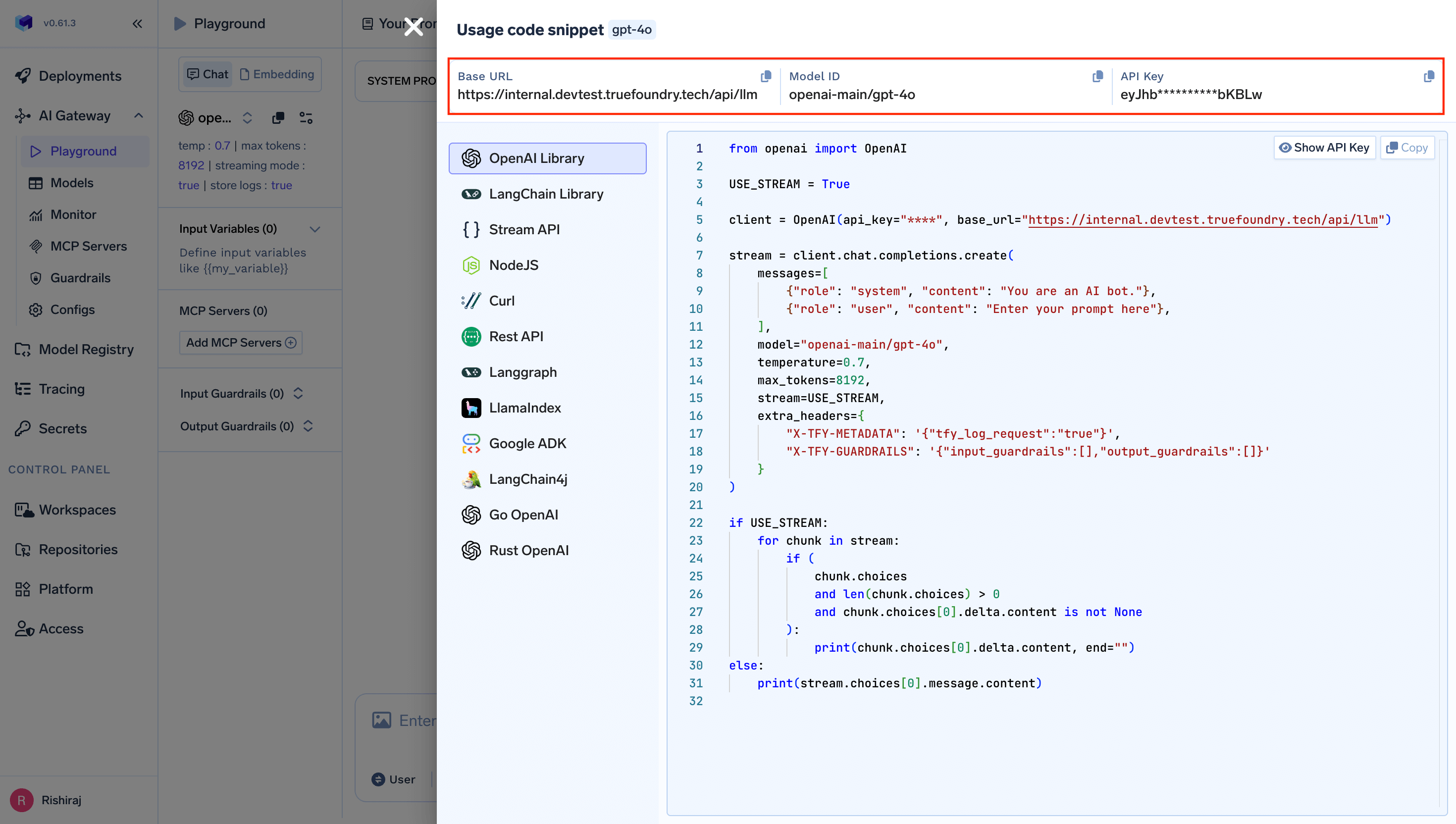
TrueFoundry playground showing unified code snippet with base URL and model name for Langroid integration
  • Set the api_base to your “gateway base url”
  • Set the api_key to your “truefoundry api key”
  • Use TrueFoundry model names as shown in the image

Basic Integration

Connect Langroid to TrueFoundry’s unified LLM gateway:
from langroid.language_models.openai_gpt import OpenAIGPTConfig
from langroid.agent.chat_agent import ChatAgent, ChatAgentConfig

TRUEFOUNDRY_PAT = "your-truefoundry-api-key"  
TRUEFOUNDRY_BASE_URL = "your-truefoundry-base-url"  

# Configure TrueFoundry connection
config = OpenAIGPTConfig(
    chat_model="openai-main/gpt-4o",  # Similarly you can call any model from any model provider like anthropic, gemini
    api_key=TRUEFOUNDRY_PAT,
    api_base=TRUEFOUNDRY_BASE_URL
)

# Create a chat agent with the configured model
agent_config = ChatAgentConfig(llm=config)
agent = ChatAgent(agent_config)

# Test the integration
response = agent.llm_response("Tell me a recipie with bread and eggs")
print(response.content)
The request is routed through your TrueFoundry gateway to the specified model provider. TrueFoundry automatically handles authentication, routing, and logging.

Advanced Example with Multi-Agent System

Build sophisticated multi-agent systems with TrueFoundry’s model access:
from langroid.language_models.openai_gpt import OpenAIGPTConfig
from langroid.agent.chat_agent import ChatAgent, ChatAgentConfig

TRUEFOUNDRY_PAT = "your-truefoundry-api-key"  # Your TrueFoundry Personal Access Token
TRUEFOUNDRY_BASE_URL = "your-truefoundry-base-url"  # Your TrueFoundry unified endpoint

# Configure different agents with different models through TrueFoundry
researcher_config = OpenAIGPTConfig(
    chat_model="anthropic-main/claude-3-5-sonnet-20241022",
    api_key=TRUEFOUNDRY_PAT,
    api_base=TRUEFOUNDRY_BASE_URL
)

writer_config = OpenAIGPTConfig(
    chat_model="openai-main/gpt-4o",
    api_key=TRUEFOUNDRY_PAT, 
    api_base=TRUEFOUNDRY_BASE_URL
)

# Create specialized agents
researcher = ChatAgent(ChatAgentConfig(llm=researcher_config))
writer = ChatAgent(ChatAgentConfig(llm=writer_config))

# Agents collaborate on a task
research_data = researcher.llm_response("Research the latest trends in AI for 2024")
final_report = writer.llm_response(f"Write a comprehensive summary based on: {research_data.content}")

print("Research:", research_data.content)
print("\nFinal Report:", final_report.content)

Interactive Chat Application

Here’s a complete example with an interactive chat interface:
import os
from dotenv import load_dotenv
from langroid.language_models.openai_gpt import OpenAIGPTConfig
from langroid.agent.chat_agent import ChatAgent, ChatAgentConfig

load_dotenv()

def create_agent():
    """Create and configure a Langroid agent with TrueFoundry"""
    config = OpenAIGPTConfig(
        chat_model="openai-main/gpt-4o",
        api_key=os.getenv("TRUEFOUNDRY_PAT"),
        api_base=os.getenv("TRUEFOUNDRY_BASE_URL")
    )
    
    agent_config = ChatAgentConfig(llm=config)
    return ChatAgent(agent_config)

def interactive_chat():
    """Interactive chat function powered by TrueFoundry"""
    agent = create_agent()
    
    print("TrueFoundry + Langroid Chat Assistant Ready!")
    print("Type your questions and press Enter. Type 'quit' or 'exit' to stop.\n")
    
    while True:
        try:
            question = input("You: ").strip()
            
            if question.lower() in ['quit', 'exit', 'bye']:
                print("Goodbye!")
                break
                
            if not question:
                continue
                
            print("AI:", end=" ")
            response = agent.llm_response(question)
            print(response.content)
            print()
            
        except KeyboardInterrupt:
            print("\nGoodbye!")
            break
        except Exception as e:
            print(f"Error: {e}")
            print("Please check your TrueFoundry configuration and try again.")

if __name__ == "__main__":
    interactive_chat()

Observability and Governance

Monitor your Langroid agents through TrueFoundry’s metrics tab: TrueFoundry metrics dashboard showing usage statistics, costs, and performance metrics for Langroid agents With Truefoundry’s AI gateway, you can monitor and analyze:
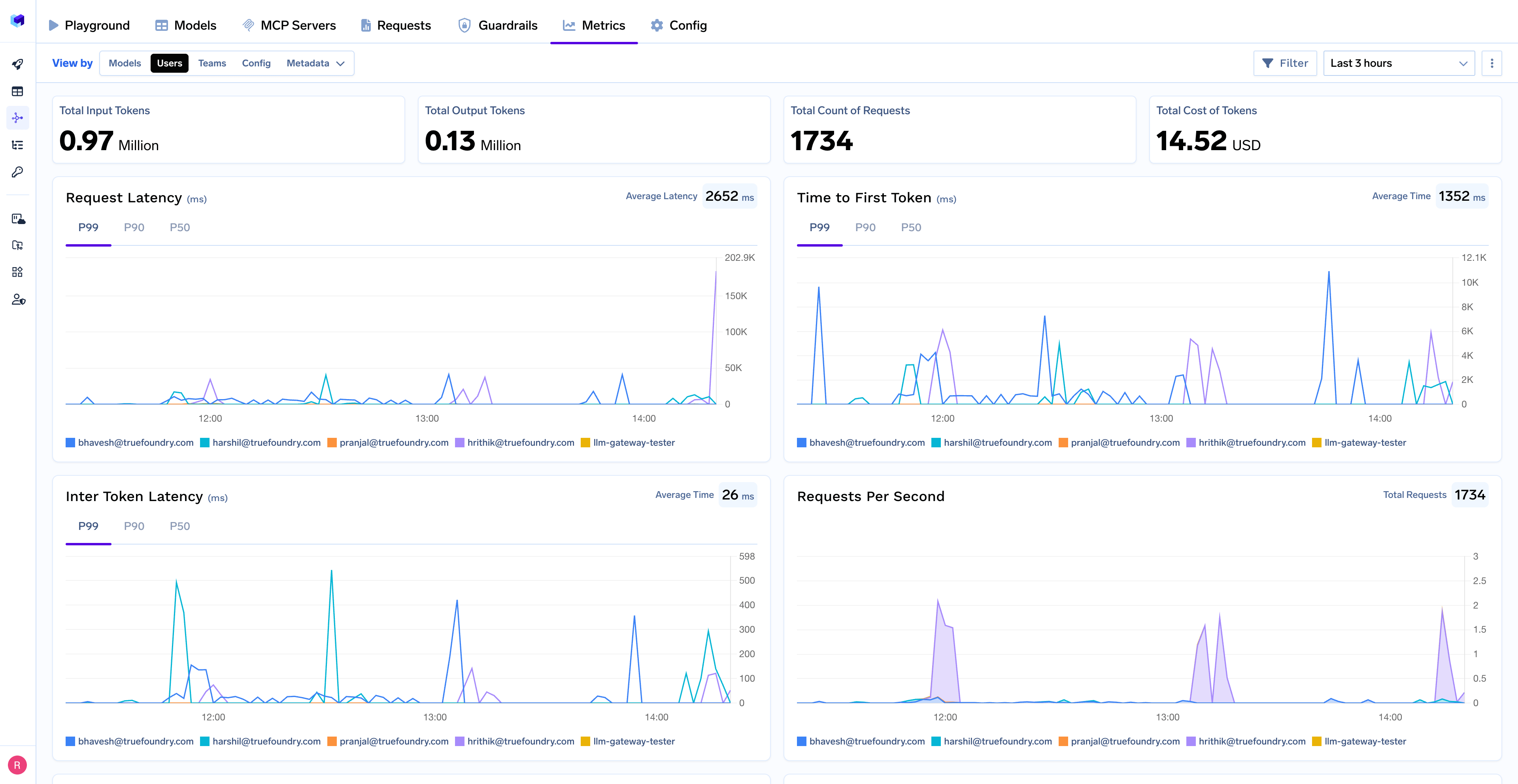
  • Performance Metrics: Track key latency metrics like Request Latency, Time to First Token (TTFS), and Inter-Token Latency (ITL) with P99, P90, and P50 percentiles
  • Cost and Token Usage: Gain visibility into your application’s costs with detailed breakdowns of input/output tokens and the associated expenses for each model
  • Usage Patterns: Understand how your application is being used with detailed analytics on user activity, model distribution, and team-based usage
  • Rate Limiting and Virtual Models: Set up rate limiting and configure Virtual Models for intelligent routing and fallback across your models