



April 17, 2025
|
5 min read

If you use VS Code and AI while you code, Cline is a great fit. When you run Cline through TrueFoundry’s AI Gateway, you keep the same in-editor coding experience while adding enterprise guardrails, observability, and cost control. This guide explains what Cline is, why routing it through the Gateway helps, and how to set it up in a few minutes.
Cline runs inside your editor and can write files, modify code, and help you debug through a natural conversation. It feels like a teammate who understands your repo context and can take action directly from VS Code, which makes it useful for both quick changes and longer refactors.
Routing Cline through TrueFoundry AI Gateway gives teams a single place to manage access and keys. Instead of distributing raw provider keys across laptops and scripts, you give Cline one TrueFoundry API key and a base URL, and the Gateway handles model provider credentials behind the scenes. This also makes it easier to rotate or expire tokens when needed without disrupting every developer’s setup.
The Gateway also helps you spend only what you intend. You can set hard budgets per user, team, app, or model so usage stops if a limit is crossed, which prevents surprise bills from loops or heavy usage patterns. Alongside budgets, you can enforce rate limits to keep traffic healthy and ensure fair usage across teams, while protecting backend capacity.
Operational visibility improves as well. You can use dashboards to track latency, token usage, cost, errors, and the rules that were triggered, and you can slice this data by model, user, team, or custom labels. When you need a trace, you can enable request logging on demand using a header, and keep logging off when you don’t need it. You can also tag every call with metadata like project, environment, tenant, or feature, then filter and chart using those tags—and even scope budgets or rate limits to those dimensions.
Start by opening VS Code with Cline installed. Open the command palette using Cmd/Ctrl + Shift + P and run “Cline: Open in new tab.” Once Cline opens, click the gear icon in the Cline tab to open its settings.
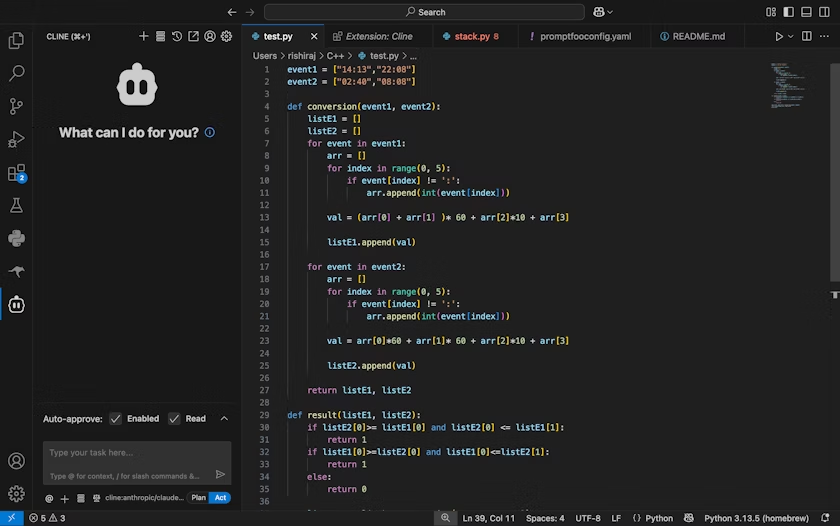
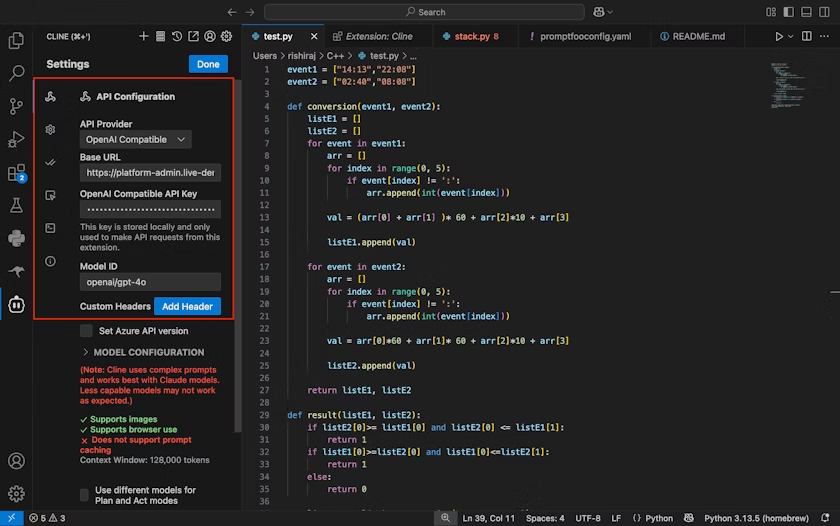
In Cline’s API settings, set the API provider to OpenAI Compatible, then enter your TrueFoundry Gateway Base URL, paste your TrueFoundry API key, and choose a Model ID that you expose via the Gateway something like openai-main/gpt-4o, or any other routed model you have configured. Save the settings, and from this point on Cline will send requests through the Gateway using the model you selected.
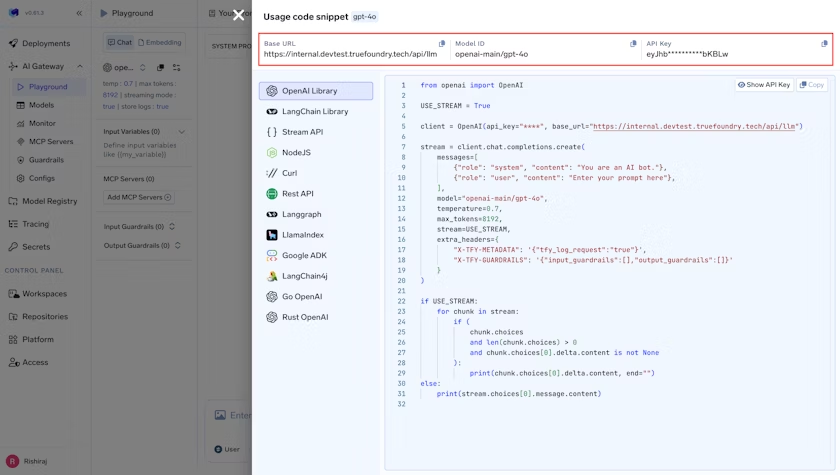
If you prefer to sanity-check connectivity outside the editor, you can also test with a short script: OpenAI-compatible clients can talk to the Gateway by setting the base URL and using your TrueFoundry key, the same way you would with any OpenAI-compatible endpoint.
A simple way to confirm everything is working is to try a mix of “create, modify, explain, debug” prompts. For example, ask Cline to create a Python function for the first N Fibonacci numbers, then ask it to add input validation and error handling, then ask it to explain the function in plain English. If you want to test debugging flows, give it a file and describe a ValueError you’re seeing, and ask it to help you fix the issue.
For team rollouts, start by choosing the right kind of key. Personal Access Tokens work well for individual developers, while Virtual Access Tokens are better for shared tools and applications because they aren’t tied to one person and can be scoped and revoked by an admin. Once keys are sorted, add budgets so one person or tool can’t overspend. Limits can be daily or monthly and can match users, teams, virtual accounts, models, or any combination. When a matching rule crosses its limit, the call is blocked.
After budgets, add rate limits to protect backends and enforce fair use. You can limit by tokens or requests and apply limits per minute, hour, or day. Rules can match by user, team, virtual account, model, or even metadata such as environment or project. If your team relies on tracking usage by business context, make request tagging a habit by sending X-TFY-METADATA with string values like customer, project, environment, or feature. Those tags become useful both for filtering dashboards and for scoping budgets and rate limits.
Logging should be deliberate. You can toggle logging per request using the X-TFY-LOGGING-CONFIG header, and in self-hosted Gateway deployments you can also set a global mode to always log or never log. When you need to review a trace, you can view logs from the Monitor section in the Gateway UI.
That is it. Cline will now send requests through the Gateway with your chosen model.
Tip: If you prefer to test with a short script, the OpenAI clients can talk to the Gateway by setting the base URL and your TrueFoundry key as shown in the access control guide.
Once Cline traffic flows through the Gateway, you can use the Metrics Dashboard to track latency, time to first token, inter-token latency, token counts, cost, and error codes. Grouping by model helps compare performance and stability across providers, while grouping by user or team makes it easier to understand usage patterns. Grouping by metadata helps you track tenant or feature-specific behavior, and if you need deeper analysis you can export metrics to CSV.
With Cline, you get fast, autonomous coding help inside the editor. With the Gateway, you get control over model access, spend, and safety, plus clarity through logs, analytics, and consistent metadata. The combination makes it easier to scale AI-assisted coding across a team without losing governance.
Cline makes coding feel lighter because it can take action directly in your repo. TrueFoundry AI Gateway makes that power safe to roll out across an organization. Once you set the base URL, choose a model, and add a key, you’re ready to code. As adoption grows, layering in budgets, rate limits, logging controls, and metadata keeps speed high without sacrificing control.
| Criteria | What should you evaluate ? | Priority | TrueFoundry |
|---|---|---|---|
| Latency | Adds <10ms p95 overhead for time-to-first-token? | Must Have | ✅ Supported |
| Data Residency | Keeps logs within your region (EU/US)? | Depends on use case | ✅ Supported |
| Latency-Based Routing | Automatically reroutes based on real-time latency/failures? | Must Have | ✅ Supported |
| Key Rotation & Revocation | Rotate or revoke keys without downtime? | Must Have | ✅ Supported |
| Key Rotation & Revocation | Rotate or revoke keys without downtime? | Must Have | ✅ Supported |
| Key Rotation & Revocation | Rotate or revoke keys without downtime? | Must Have | ✅ Supported |
| Key Rotation & Revocation | Rotate or revoke keys without downtime? | Must Have | ✅ Supported |
| Key Rotation & Revocation | Rotate or revoke keys without downtime? | Must Have | ✅ Supported |

Blazingly fast way to build, track and deploy your models!
TrueFoundry AI Gateway delivers ~3–4 ms latency, handles 350+ RPS on 1 vCPU, scales horizontally with ease, and is production-ready, while LiteLLM suffers from high latency, struggles beyond moderate RPS, lacks built-in scaling, and is best for light or prototype workloads.


The latest news, articles, and resources sent to your inbox
© 2025 All rights reserved.


.png)


