%20(28).webp)
June 1, 2026
|
5 min read


Get instant access to a live TrueFoundry environment. Deploy models, route LLM traffic, and explore the full platform — your sandbox is ready in seconds, no credit card required.



Updated: October 9, 2025
Blazingly fast way to build, track and deploy your models!
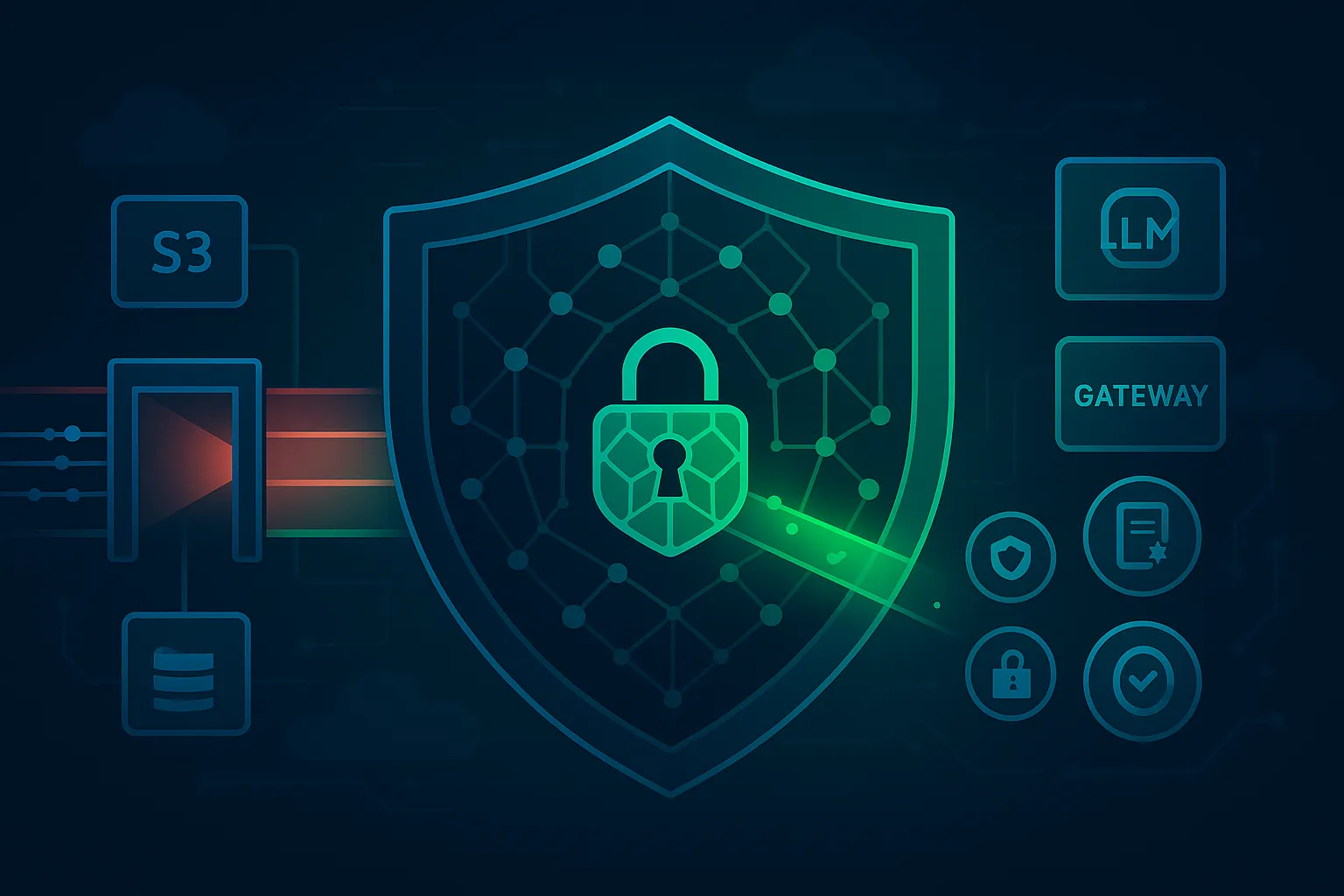
Modern LLM teams move fast but they also need real, practical AI security. We have integrated with many guardrail providers and we bring another integration for our enterprise clients- Pangea integration to the TrueFoundry AI gateway, so that teams can detect prompt-injection, redact sensitive data, and enforce content policies without rewiring their stack.
Pangea provides a suite of programmable security services tailored for AI workloads - most notably AI Guard for detecting risky content and enforcing policies, and Redact for automatically removing sensitive data. It introduces the idea of recipes: reusable guard configurations you define in the Pangea console and call from your app or platform. Bringing Pangea into your AI gateway means you can apply these safeguards to every request and response across providers, models, tools, and agents without touching application code paths.
Key Metrics for Evaluating Gateway
| Criteria | What should you evaluate ? | Priority | TrueFoundry |
|---|---|---|---|
| Latency | Adds <10ms p95 overhead for time-to-first-token? | Must Have | ✅ Supported |
| Data Residency | Keeps logs within your region (EU/US)? | Depends on use case | ✅ Supported |
| Latency-Based Routing | Automatically reroutes based on real-time latency/failures? | Must Have | ✅ Supported |
| Key Rotation & Revocation | Rotate or revoke keys without downtime? | Must Have | ✅ Supported |
| Key Rotation & Revocation | Rotate or revoke keys without downtime? | Must Have | ✅ Supported |
| Key Rotation & Revocation | Rotate or revoke keys without downtime? | Must Have | ✅ Supported |
| Key Rotation & Revocation | Rotate or revoke keys without downtime? | Must Have | ✅ Supported |
| Key Rotation & Revocation | Rotate or revoke keys without downtime? | Must Have | ✅ Supported |

At a high level:
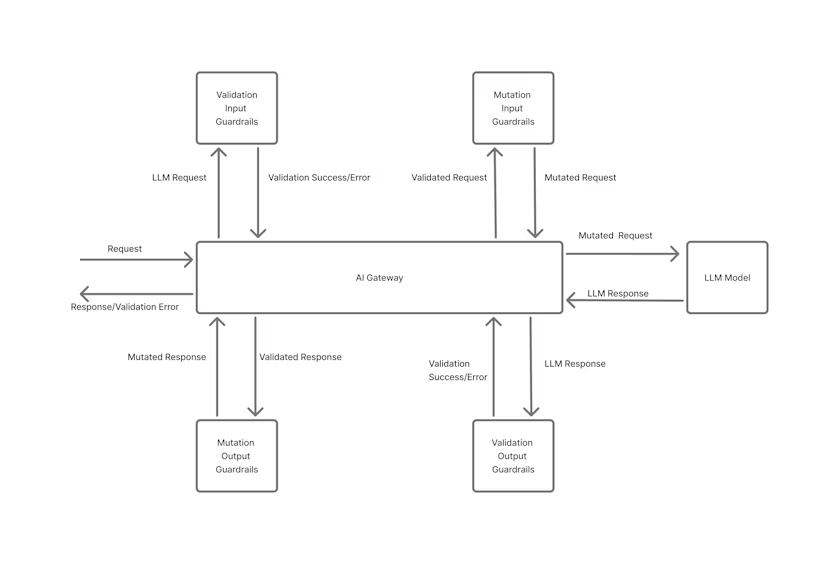
You can attach Pangea checks to any of these phases:
They’re configured as “guards” in the gateway, with Pangea as the provider.
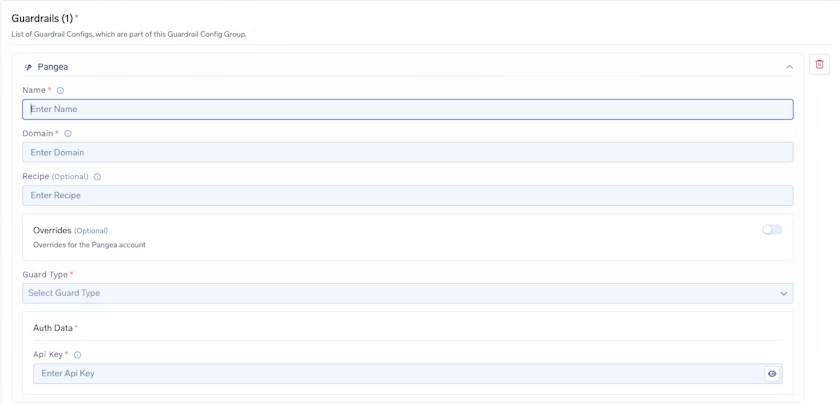
To add a Pangea integration, start by entering a name for your guardrails group and then add any collaborators who should have access to manage or use this group. After that, configure the Pangea Config by giving it a name and specifying the domain for the cloud provider and region where your Pangea project is set up. For example, if your endpoint is https://<service_name>.aws.us-west-2.pangea.cloud/v1/text/guard, then the domain you should enter is aws.us-west-2.pangea.cloud. You can also optionally provide a recipe key, which points to a predefined configuration in the Pangea User Console that defines what rules should be applied to the text, such as defanging malicious URLs. If you want to apply custom settings that override your default Pangea account configuration, you can enable Overrides. Next, choose the Guard Type from the dropdown, based on the type of protection you want to apply.
Finally, under Pangea Authentication Data, provide the API Key used to authenticate requests to Pangea services. This key is required for the integration to work, and you can obtain it from the Pangea Console by going to your project dashboard and opening the Tokens or API Keys section. Make sure this key is kept secure, since it provides access to your Pangea security services.
All decisions are visible in your gateway logs; Pangea also maintains an audit trail within your project for investigations and reviews.
Once Pangea is wired into the gateway, the biggest operational win is consistency. Teams don’t have to remember to “turn on” security in every microservice or agent workflow, because the same checks apply wherever traffic flows whether it’s a simple chat completion, an agent tool call, or a retrieval-augmented pipeline. This reduces policy drift over time and makes it much easier to roll out new protections (or tighten existing ones) without coordinating code changes across multiple teams.
It also improves day-two operations when something goes wrong. When a user reports unsafe output or suspicious behavior, platform teams can trace exactly which guard fired, what action was taken, and which route and model were involved all from the gateway’s logs and audit signals. That makes investigations faster and helps security and AI teams build a shared, repeatable workflow for reviewing incidents, tuning recipes, and validating changes before they reach production.
Over time, teams typically evolve from “basic blocking and redaction” to more nuanced policies that balance safety and user experience. For example, you may choose to block clear prompt-injection attempts, redact specific PII types, and transform risky content like URLs or code snippets, while still allowing the rest of the request to proceed. With Pangea recipes and gateway-level enforcement, those changes become configuration updates rather than rewrites, letting teams iterate on security controls at the same pace they iterate on prompts, models, and product features.
Does this add latency?
The call happens at the AI gateway; with caching and concise recipes, the overhead is typically small relative to model latency.
Is model choice constrained?
No. Policies apply across providers and models since they’re enforced at the AI gateway boundary.
Can we combine with other guardrails?
Yes, stack Pangea with additional gateway guards for layered AI security.
If you’re scaling LLM workloads, this pairing gives you a clean, centralized control point: AI security that travels with every call, and an AI gateway that keeps your apps fast, consistent, and compliant.
TrueFoundry AI Gateway delivers ~3–4 ms latency, handles 350+ RPS on 1 vCPU, scales horizontally with ease, and is production-ready, while LiteLLM suffers from high latency, struggles beyond moderate RPS, lacks built-in scaling, and is best for light or prototype workloads.




The latest news, articles, and resources sent to your inbox
© 2026 All rights reserved.






.webp)
.webp)