The workflow recovery feature allows you to resume a failed workflow execution from the exact step or task where it failed, rather than restarting the entire workflow from scratch. This is particularly useful when:
  • A workflow fails due to transient issues (network timeouts, temporary resource unavailability)
  • You want to avoid re-running expensive or time-consuming tasks that already completed successfully
  • You need to conserve compute resources by not repeating completed work
When you recover a workflow execution, TrueFoundry automatically identifies the failed task and resumes execution from that point. All previously completed tasks retain their outputs and are not re-executed.

How to Recover a Failed Workflow Execution

To recover a failed workflow execution, you need:
  • The Application ID of the application/workflow
  • The Execution ID of the failed execution
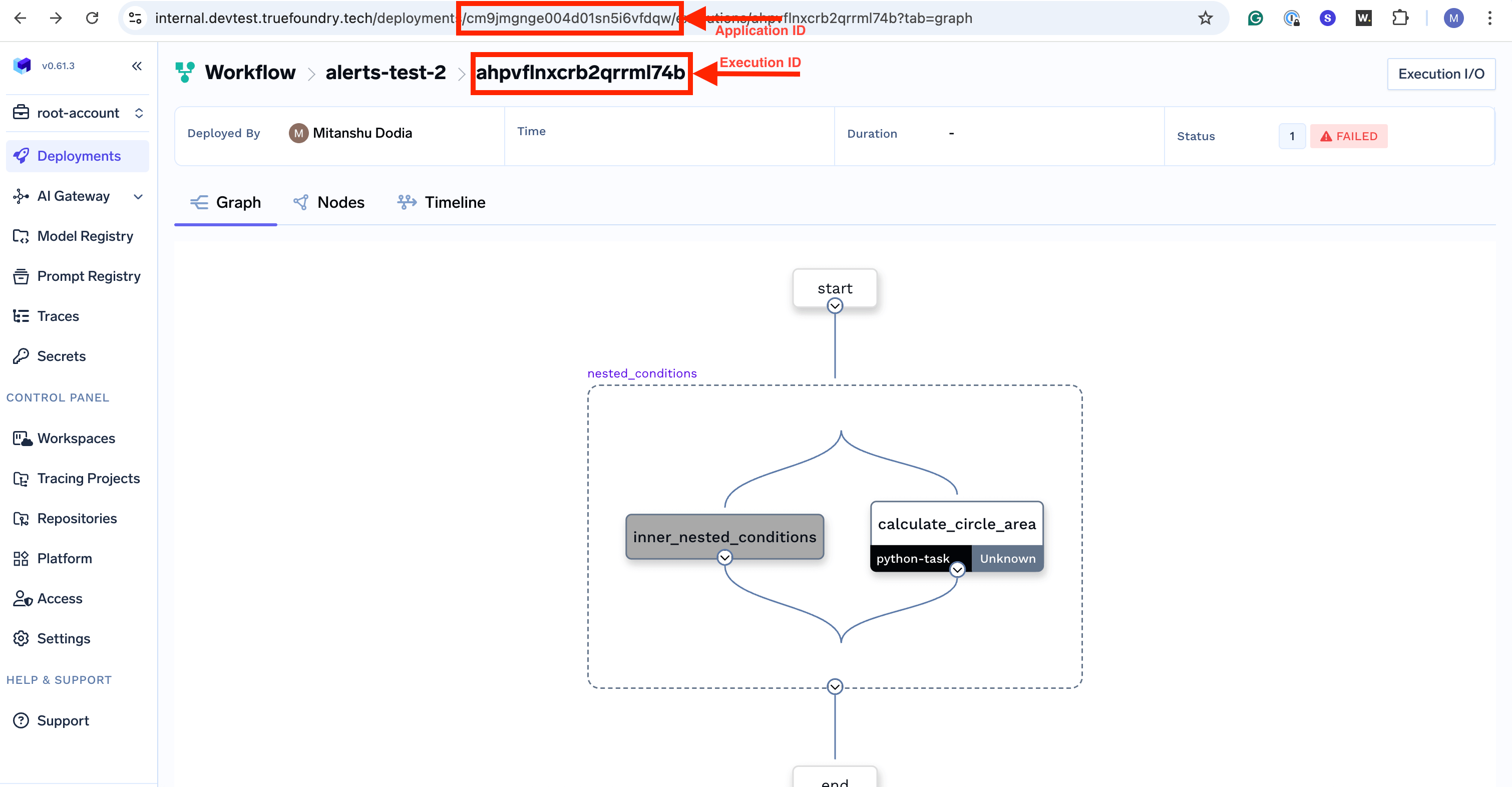
You can find both of these in the TrueFoundry UI on the workflow execution details page.

Using the REST API

You can recover a failed workflow execution by making a POST request to the recover endpoint:
curl -X 'POST' \
  'https://<your-control-plane-url>/api/svc/v1/workflow/<application-id>/executions/<execution-id>/recover' \
  -H 'accept: */*' \
  -H 'Authorization: Bearer <your-api-token>' \
  -d ''

API Parameters

ParameterTypeDescription
application-idstringThe unique identifier of the application. Found in the application/workflow details page URL.
execution-idstringThe unique identifier of the failed execution you want to recover. Found in the execution details page.

Authentication

The API requires a valid TrueFoundry API token passed in the Authorization header as a Bearer token. You can generate an API token from the TrueFoundry UI under your account settings. For more information, see Generating TrueFoundry API Keys.

Example: Recovering a Failed Workflow

Let’s say you have a workflow with three tasks where task_2 failed:
from truefoundry.workflow import (
    PythonTaskConfig,
    TaskPythonBuild,
    task,
    workflow,
)

task_config = PythonTaskConfig(
    image=TaskPythonBuild(
        pip_packages=["truefoundry[workflow]==0.9.1"],
    ),
)

@task(task_config=task_config)
def task_1(data: str) -> str:
    print("Task 1: Processing data")
    return f"processed_{data}"

@task(task_config=task_config)
def task_2(data: str) -> str:
    print("Task 2: Transforming data")
    # This task might fail due to external API issues
    result = call_external_api(data)
    return result

@task(task_config=task_config)
def task_3(data: str) -> str:
    print("Task 3: Finalizing")
    return f"final_{data}"

@workflow
def my_data_pipeline(input_data: str) -> str:
    step1 = task_1(data=input_data)
    step2 = task_2(data=step1)
    step3 = task_3(data=step2)
    return step3
If task_2 fails after task_1 completes successfully, you can recover the execution:
curl -X 'POST' \
  'https://your-truefoundry-url.com/api/svc/v1/workflow/your-workflow-id/executions/failed-execution-id/recover' \
  -H 'accept: */*' \
  -H 'Authorization: Bearer your-api-token' \
  -d ''
When recovered:
  • task_1 will not be re-executed (its output is preserved)
  • task_2 will be re-executed from the beginning
  • task_3 will execute after task_2 completes successfully
The recover operation can only be performed on failed executions. Attempting to recover a successful or running execution will result in an error.