A Spark task runs your Python code inside a PySpark context. You use the same @task decorator as other workflow tasks, but pass task_config=PySparkTaskConfig(...) so the task is executed as a Spark job. The task gets a SparkSession from the execution context (e.g. flytekit.current_context().spark_session), which you use for all Spark operations. Install the TrueFoundry workflow SDK with Spark support. This adds the workflow and spark extras so you can use PySparkTaskConfig and run Spark tasks.
pip install truefoundry[workflow,spark]

PySparkTaskConfig

image
TaskPySparkBuild
required
Spark version and optional build options (e.g. spark_version, pip_packages, requirements_path).
driver_config
SparkDriverConfig
required
Driver resources (e.g. resources).
executor_config
SparkExecutorConfig
required
Executor config with instances: SparkExecutorFixedInstances (e.g. count=2) or SparkExecutorDynamicScaling (e.g. min=1, max=10), and optional resources for executors.
spark_conf
dict[str, any]
Extra Spark config (e.g. {"spark.sql.shuffle.partitions": "200"}).
env
dict[str, str]
Environment variables (plain or secret refs).
mounts
Volume mounts for the task.
service_account
str
required
Kubernetes service account name to use. The service account should have the required permissions (e.g. AWS S3 read/write).

TaskPySparkBuild (for image)

spark_version
str
Spark version (default "3.5.2"). Should match the Spark version installed in the image.
docker_registry
typing.Optional[str]
FQN of the container registry. If you can’t find your registry here, add it through the Integrations page.
requirements_path
typing.Optional[str]
Path to requirements.txt relative to the path to build context.
pip_packages
typing.Optional[list[str]]
Pip package requirements (e.g. ["fastapi>=0.90,<1.0", "uvicorn"]).
apt_packages
typing.Optional[list[str]]
Debian packages to install via apt-get (e.g. ["git", "ffmpeg", "htop"]).

Getting the session from the execution context

The Spark task plugin creates a SparkSession before your task runs. Inside the task, get the session from the Flyte execution context:
spark_session = flytekit.current_context().spark_session
Use this spark_session for all Spark operations in the task.

Example

Use truefoundry[workflow,spark] in all task images in this file (including non-Spark tasks in the example below). When Flyte loads the module for any task, it imports the whole file, so PySparkTaskConfig and Spark tasks must be importable; the [workflow,spark] extra pulls in pyspark. Non-Spark tasks still need it in their image so the module loads correctly.
import datetime
import random
from operator import add

from truefoundry.deploy.v2.lib.patched_models import (
    Resources,
    SparkDriverConfig,
    SparkExecutorConfig,
    SparkExecutorFixedInstances,
    TaskPySparkBuild,
)
from truefoundry.workflow import PySparkTaskConfig, task, workflow, PythonTaskConfig, TaskPythonBuild

@task(
    task_config=PySparkTaskConfig(
        image=TaskPySparkBuild(
            pip_packages=[
                "truefoundry[workflow,spark]",
                "setuptools"
            ],
        ),
        driver_config=SparkDriverConfig(
            resources=Resources(
                cpu_request=1.0,
                cpu_limit=2.0,
                memory_request=2048,
                memory_limit=2048,
                ephemeral_storage_request=2000,
                ephemeral_storage_limit=4000,
            )
        ), 
        # Executor configuration (required)
        executor_config=SparkExecutorConfig(
            instances=SparkExecutorFixedInstances(count=10),
            resources=Resources(
                cpu_request=1.0,
                cpu_limit=1.0,
                memory_request=1024,
                memory_limit=1024,
                ephemeral_storage_request=1000,
                ephemeral_storage_limit=2000,
            ),
        ),
        spark_conf={
            "spark.sql.adaptive.enabled": "true",
            "spark.sql.adaptive.coalescePartitions.enabled": "true",
            "spark.ui.enabled": "true",
            "spark.ui.proxyRedirectUri": "/",
        },
        # Replace with your k8s Service Account
        service_account="k8s-service-account",
    ), retries=3
)
def hello_spark(partitions: int) -> float:
    # generate a random number between 0 and 1
    import flytekit

    # Define map function inside task to avoid serialization issues when Flyte loads the task
    def _monte_carlo_point(_):
        x = random.random() * 2 - 1
        y = random.random() * 2 - 1
        return 1 if x**2 + y**2 <= 1 else 0

    print("Starting Spark with Partitions: {}".format(partitions))

    n = 1 * partitions
    sess = flytekit.current_context().spark_session
    count = (
        sess.sparkContext.parallelize(range(1, n + 1), partitions)
        .map(_monte_carlo_point)
        .reduce(add)
    )

    pi_val = 4.0 * count / n
    return pi_val

@task(
    task_config=PythonTaskConfig(
        image=TaskPythonBuild(
            python_version="3.9",
            pip_packages=["truefoundry[workflow,spark]"],
        ),
        resources=Resources(cpu_request=0.5),
    ),
)
def print_every_time(value_to_print: float, date_triggered: datetime.datetime) -> int:
    print("My printed value: {} @ {}".format(value_to_print, date_triggered))
    return 1

# Finally, define a workflow that connects your tasks in a sequence.
# Remember, Spark and non-Spark tasks can be chained together as long as their parameter specifications match.
@workflow()
def my_spark(
    triggered_date: datetime.datetime = datetime.datetime(2020, 9, 11),
):
    """
    Using the workflow is still as any other workflow. As image is a property of the task, the workflow does not care
    about how the image is configured.
    """
    # task1 → task2 → task3 (sequential via data dependencies)
    pi = hello_spark(partitions=10000)
    print_every_time(value_to_print=pi, date_triggered=triggered_date)
The plugin provides the SparkSession before the task body runs. Obtain it in your task with flytekit.current_context().spark_session.

Viewing Spark UI

From the workflow run you can open the Spark UI to monitor your Spark job. The workflow UI shows a button to open the Spark UI:
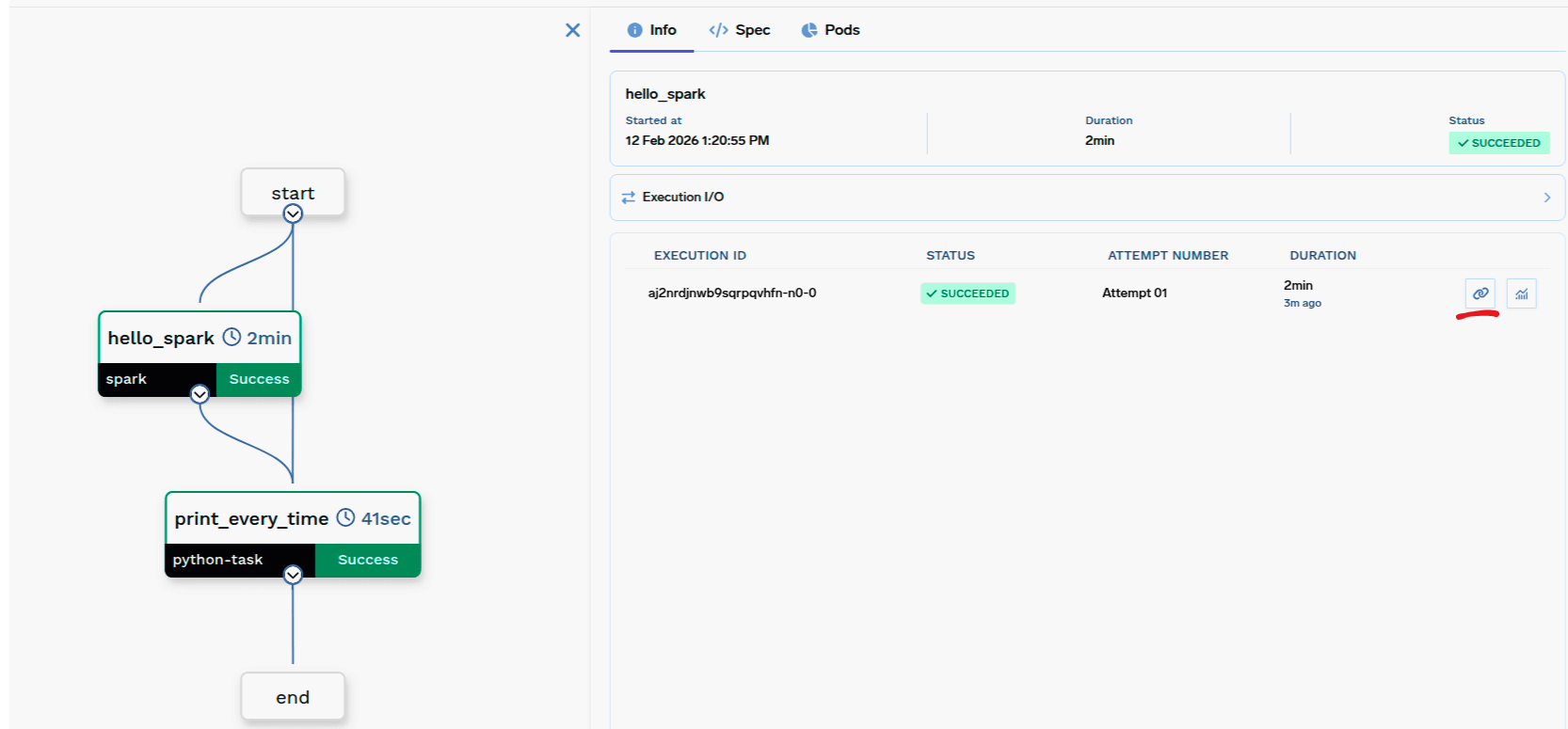
Workflow UI with button to see Spark UI
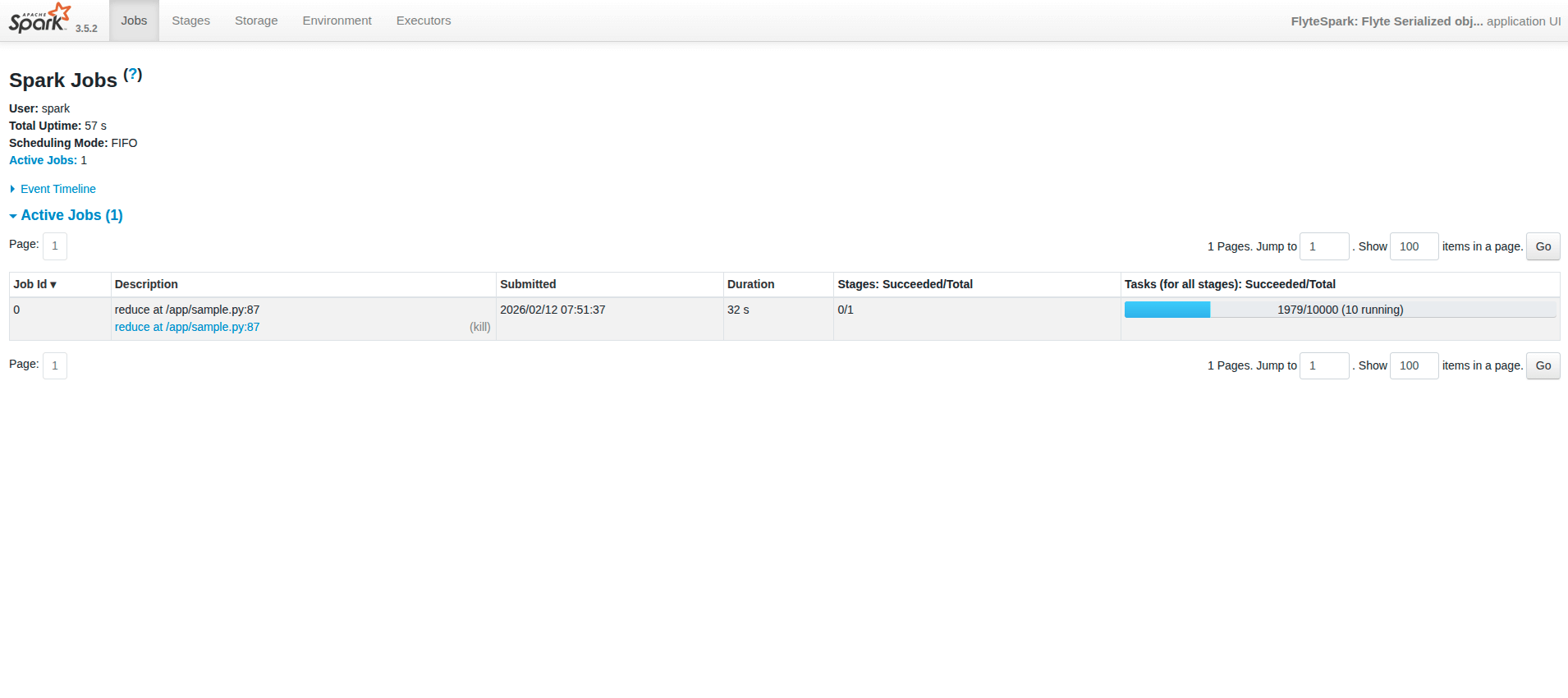
Clicking it opens the Spark UI:
Spark UI
  • Spark UI may take up to ~1 minute to become live while the Spark UI page is setting up.
  • Once a job is done, the history server is enabled, so you can view past jobs.
  • If the UI shows “not found”, try opening it again by clicking the Spark UI button from the workflow UI.

Checklist

  • Use @task(task_config=PySparkTaskConfig(...)) with image, driver_config, and executor_config.
  • image is TaskPySparkBuild (includes spark_version).
  • driver_config = SparkDriverConfig; executor_config = SparkExecutorConfig (with instances = fixed or dynamic).
  • Task code gets the SparkSession via flytekit.current_context().spark_session.
  • Register the task in a @workflow and call it like any other task (e.g. my_spark_task(partitions=4)).