

TrueFoundry API keys are bearer tokens that let you authenticate to the platform programmatically — from the CLI / Python SDK, the REST API, the AI Gateway, the MCP Gateway, and CI/CD pipelines. The same token works across all of these surfaces.Documentation Index
Fetch the complete documentation index at: https://www.truefoundry.com/llms.txt
Use this file to discover all available pages before exploring further.
The CLI and Python SDK accept the API key via the
TFY_API_KEY environment variable. For HTTP APIs (REST, AI Gateway, MCP Gateway), pass the same token in the Authorization: Bearer … header.Token types
TrueFoundry has two token types — pick the one that matches the identity you need:| Token type | Tied to | Permissions | Lifecycle | Best for |
|---|---|---|---|---|
| Personal Access Token (PAT) | A TrueFoundry user | Inherits the user’s permissions | Becomes invalid if the user is deactivated or removed | Local development, personal scripts, individual experimentation |
| Virtual Account token (VAT) | A virtual account | Whatever the virtual account is granted | Independent of any user — survives staff turnover and supports auto-rotation | Production applications, services, CI/CD, shared automations |
Choosing between PAT and VAT
| Scenario | Recommended token |
|---|---|
| Local development and testing | PAT |
| Personal scripts and notebooks | PAT |
| Quick prototyping | PAT |
| CI/CD pipelines | VAT |
| Production services and APIs | VAT |
| Shared team applications | VAT |
| Long-running agents and workflows | VAT |
Personal Access Tokens (PATs)
A PAT is created by a user and inherits all permissions of that user. Any user can create a PAT for themselves — admins can additionally configure tenant-wide limits and revoke other users’ tokens.Create a PAT
In the platform, go to Access > Personal Access Tokens and create a new token.Admin controls
Configure tenant-wide PAT limits
Configure tenant-wide PAT limits
Admins can limit the maximum age and number of tokens that a single user can create under Settings > Security.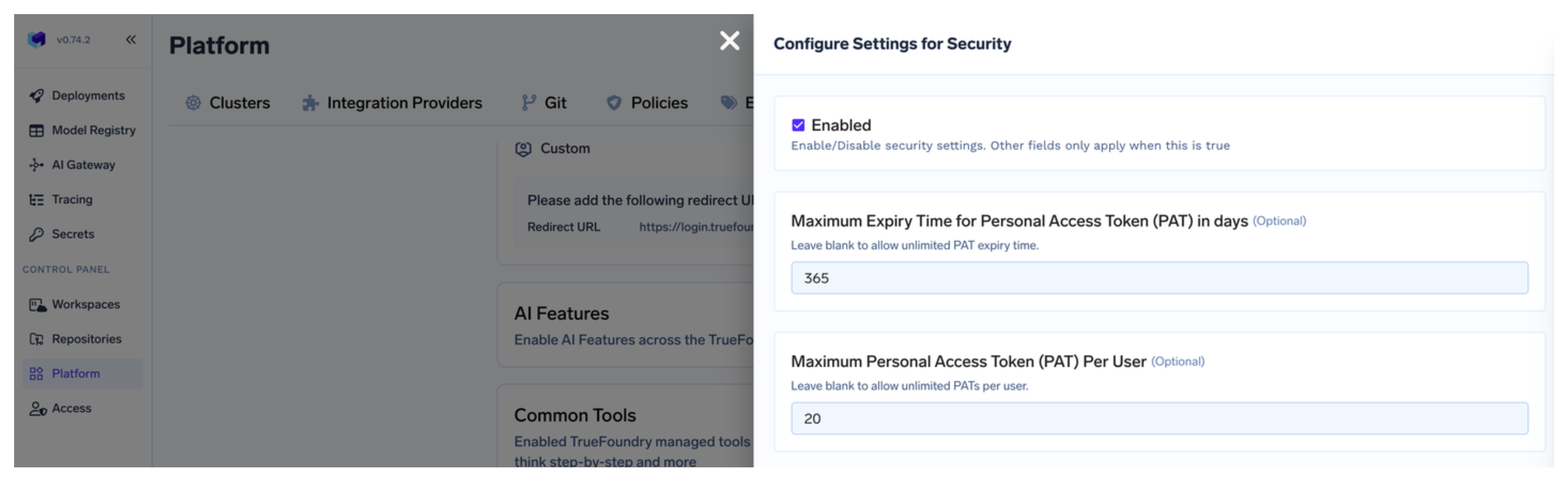
Revoke a user's PATs
Revoke a user's PATs
Admins can revoke all active personal access tokens for a particular user from Access > Users.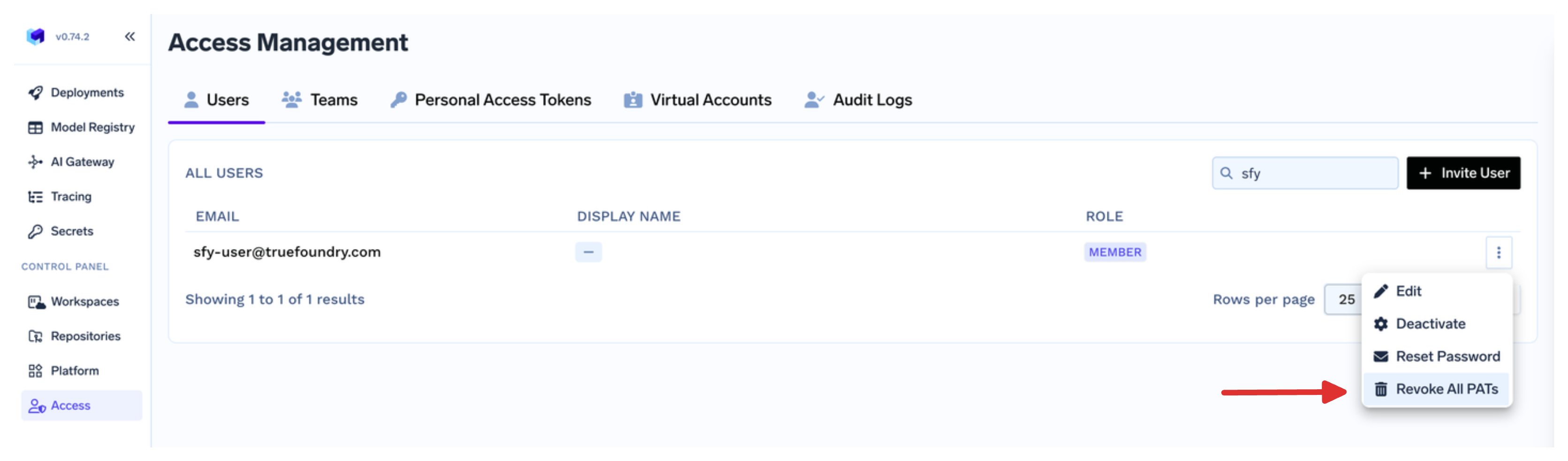
Virtual Account tokens (VATs)
A virtual account is a non-user identity owned by an admin (or by a team if allowed by a custom role). It’s granted exactly the permissions an application needs, and its token survives staff turnover.Create a virtual account
In the platform, go to Access > Virtual Accounts and create a new account, picking the resources and roles your application needs.
Get the token
Click Get Token on the virtual account to retrieve the bearer token. Use this as your API key in the application.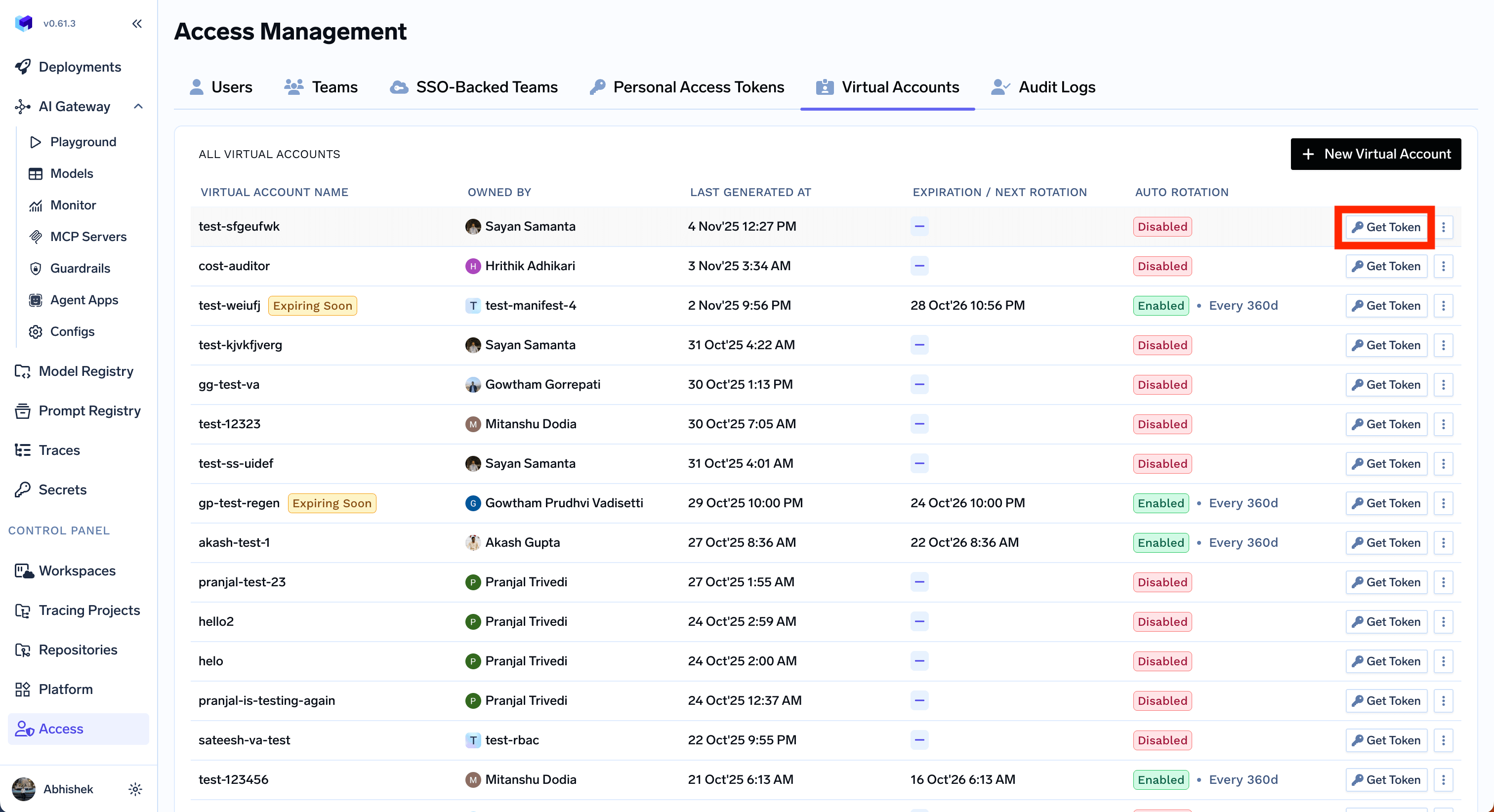
(Optional) Configure rotation, notifications, or secret store sync
Virtual accounts support advanced lifecycle features that PATs don’t:
- Auto-rotation — rotate the token at a configurable interval, with a grace period for the previous token. See Configure auto-rotation.
- Rotation notifications — get email or Slack alerts when a token rotates. See Configure notification on token rotation.
- Secret store sync — write the token to AWS Secrets Manager, HashiCorp Vault, Google Secret Manager, Azure Key Vault, etc., and keep it in sync on rotation. See Configure secret store sync.
- Identity provider mapping — let an externally issued JWT resolve to this virtual account. See Identity provider mappings.
Using your API key
Pass your API key as a Bearer token in theAuthorization header for all TrueFoundry HTTP APIs — REST, AI Gateway, and MCP Gateway:
| Use case | How to provide the key |
|---|---|
| TrueFoundry CLI / Python SDK | TFY_API_KEY environment variable — see Setup CLI |
| REST API | Authorization: Bearer … header — see the API reference |
| AI Gateway with OpenAI / Anthropic / other SDKs | OPENAI_API_KEY (or equivalent) pointed at the Gateway — see AI Gateway Authentication |
| CI/CD pipelines | Store as a CI secret, expose as TFY_API_KEY — see Set Up CI/CD and GitOps |
Security best practices
- Scope to least privilege. Grant a virtual account only the resources and roles its application needs — never reuse an admin’s token for a service.
- Rotate regularly. Configure auto-rotation for VATs. For PATs, set tenant-wide age and count limits under Settings > Security.
- Sync to a secret store. Use secret store sync so the live token lives in your secret manager rather than in source code or CI variables.
- Revoke on suspicion. Admins can revoke all PATs for a user from Access > Users, and rotate or delete a virtual account from Access > Virtual Accounts.
- Never commit tokens to source control. Read them from environment variables or your secret store at runtime.