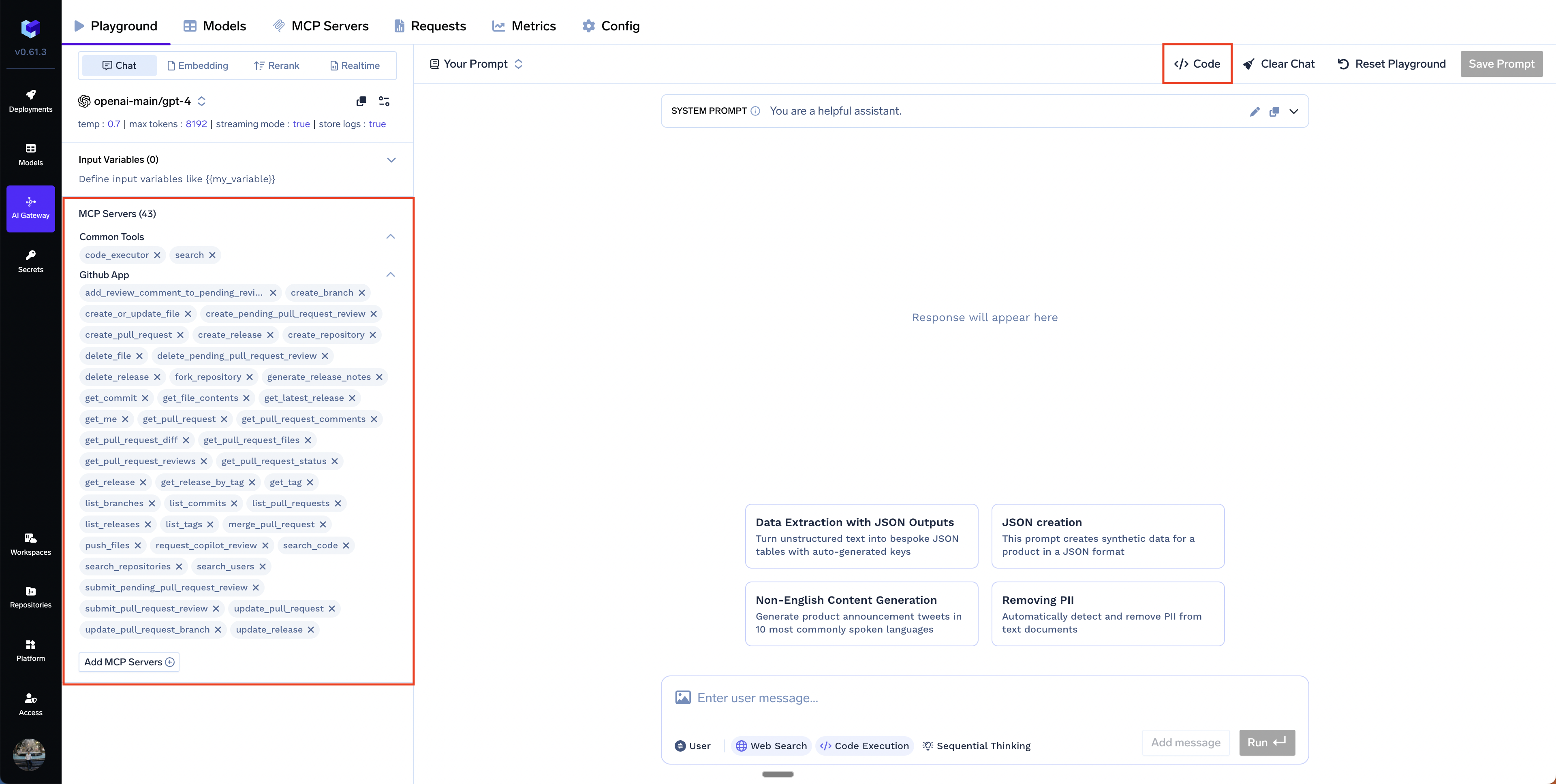
When we interact with the prompt in the AI gateway playground, the playground UI renders the tool calls, their arguments, results and the LLM responses as they are streamed back from the gateway. If you want to do the same in your own application, or a different UI apart from the TrueFoundry playground, you can use the Agent API described below.
http POST https://${TFY_CONTROL_PLANE_BASE_URL}/api/llm/agent/chat/completions \
  Authorization:"Bearer ${TFY_API_TOKEN}" \
  Content-Type:application/json \
  model=openai/gpt-4o stream:=true \
  messages:='[{"role":"user","content":"Help me find a model that can generate images"}]' \
  mcp_servers:='[{"integration_fqn":"common-tools","enable_all_tools":false,"tools":[{"name":"web_search"}]}]'
Copy
Ask AI
curl --location 'https://${TFY_CONTROL_PLANE_BASE_URL}/api/llm/agent/chat/completions' \
  --header 'Content-Type: application/json' \
  --header "Authorization: Bearer ${TFY_API_TOKEN}" \
  --data-raw '{
    "model": "openai/gpt-4o",
    "messages": [{"role": "user", "content": "Help me find a model that can generate images"}],
    "stream": true,
    "mcp_servers": [{
      "integration_fqn": "common-tools",
      "enable_all_tools": false,
      "tools": [{ "name": "web_search" }]
    }]
  }'
When you have MCP servers already registered in your TrueFoundry AI Gateway, you can reference them using their integration_fqn:
HTTPie
curl
Copy
Ask AI
http POST https://${TFY_CONTROL_PLANE_BASE_URL}/api/llm/agent/chat/completions \
  Authorization:"Bearer ${TFY_API_TOKEN}" \
  Content-Type:application/json \
  model=openai/gpt-4o stream:=true \
  messages:='[{"role":"user","content":"Search for Python tutorials and run a simple code example"}]' \
  mcp_servers:='[{"integration_fqn":"common-tools","enable_all_tools":false,"tools":[{"name":"web_search"},{"name":"code_executor"}]}]'
Method 2: Using x-tfy-mcp-headers header (Registered servers only)
For Agent API requests with registered MCP servers, you can also pass custom headers using the x-tfy-mcp-headers HTTP header. This method uses an FQN-based format where you specify headers for each MCP server using its fully qualified name (FQN).
The x-tfy-mcp-headers header only works with registered MCP servers (using integration_fqn). For external servers (using url), you must use the headers field within the mcp_servers array as shown in Method 1.
Format: The header value should be a JSON string with the structure:
Whether to stream responses (only true is supported)
iteration_limit
number
✗
5
Maximum tool call iterations (1-20)
About tool call iterations: An iteration represents a full loop of user → model → tool call → tool result → model. The iteration_limit sets the maximum number of such loops per request to prevent runaway chains.
The Chat API uses Server-Sent Events (SSE) to stream responses in real-time. This includes assistant text, tool calls (function names and their arguments), and tool results.
Both assistant content and tool call arguments are streamed incrementally across multiple chunks. You must accumulate these fragments to build complete responses.
Compatibility: The streaming format follows OpenAI Chat Completions streaming semantics. See the official guide: OpenAI streaming responses. In addition, the Gateway emits tool result chunks as extra delta events (with role: "tool", tool_call_id, and content) to carry tool outputs.
Role emission differs by provider. Do not assume the role is only present on the first chunk. Clients should set the role on the first chunk and carry it forward for subsequent chunks, and safely ignore repeated role fields on later chunks.
Concatenate delta.content across chunks to build the full assistant message.
Append function.arguments fragments per index to reconstruct full arguments.
Completion of this phase is indicated by finish_reason: "tool_calls".
Anthropic-specific behavior: Anthropic may stream an empty string for tool-call arguments ("arguments": ""). When invoking the tool, their API expects a valid JSON object. Normalize empty arguments to {} before issuing the call.
Copy
Ask AI
args = tool_call.function.arguments or ""if args.strip() == "": args = "{}" # Anthropic requires an empty JSON object
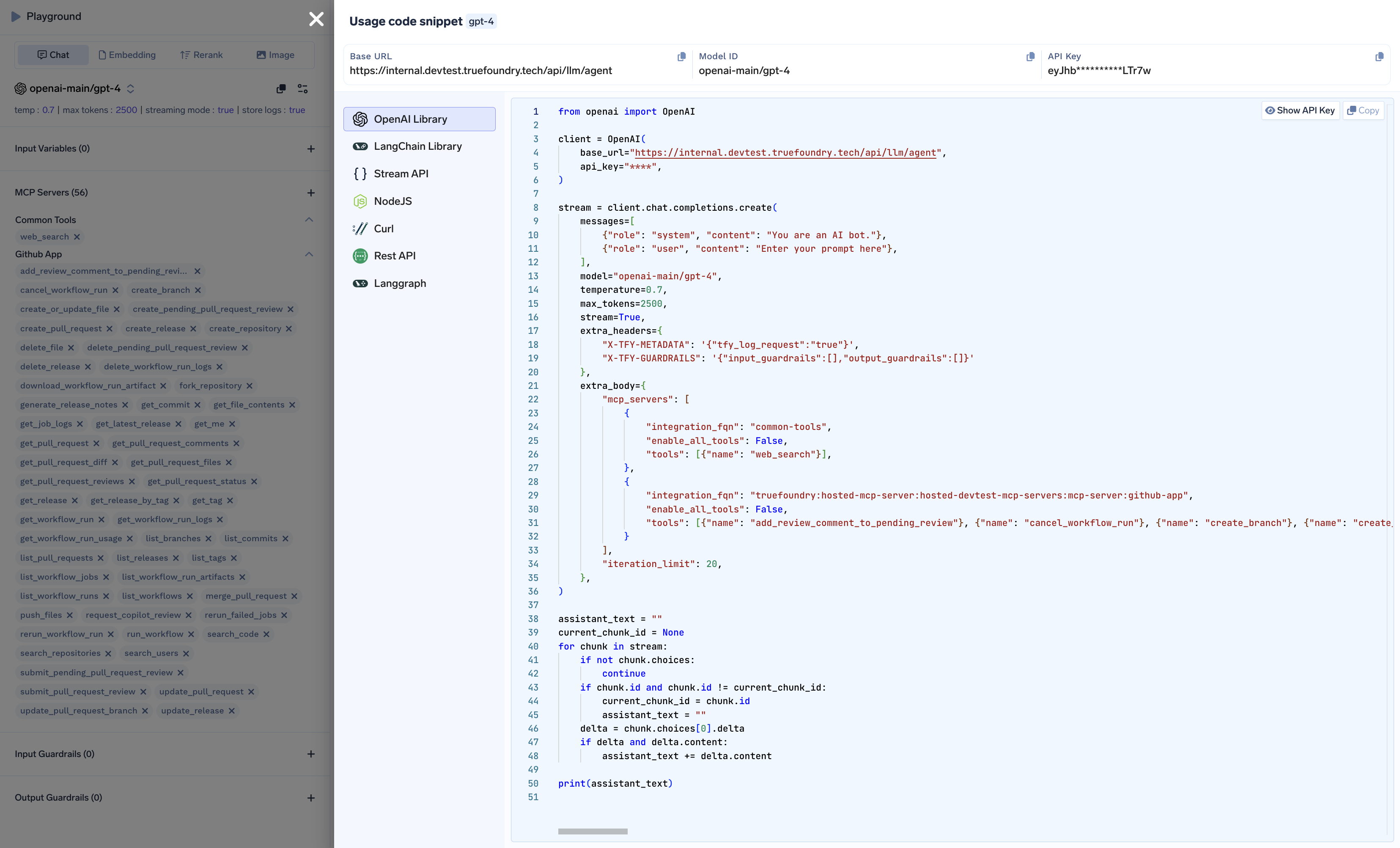
You can generate a ready-to-use code snippet directly from the AI Gateway web UI:
Go to the Playground or your MCP Server group in the AI Gateway.
Click the API Code Snippet button.
Copy the generated code and use it in your application.
The generated code snippet from the playground will only show the last assistant message, and will not show tool calls and results from that conversation.
The get_messages function processes the streaming response to reconstruct complete messages. Let’s break it down:
1. Initialize and detect new messages
Copy
Ask AI
def get_messages(chat_stream):
    messages = []
    previous_chunk_id = None

    for chunk in chat_stream:
        if not chunk.choices:
            continue

        delta = chunk.choices[0].delta

        # Detect new message when chunk ID changes
        if chunk.id != previous_chunk_id:
            previous_chunk_id = chunk.id
            messages.append({"role": delta.role, "content": ""})

        current_message = messages[-1]
What’s happening: Each streaming chunk has an ID. When the ID changes, it signals a new message starting (assistant, tool result, etc.). We create a new message object with the role and empty content.
2. Handle tool result messages
Copy
Ask AI
        # Set tool_call_id for tool result messages
        if delta.role == 'tool':
            current_message["tool_call_id"] = delta.tool_call_id
What’s happening: Tool result messages have role: "tool" and include a tool_call_id that links the result back to the specific tool call that generated it.
3. Accumulate message content
Copy
Ask AI
        # Accumulate content for all message types (assistant text, tool results)
        current_message["content"] += delta.content if delta.content else ""
What’s happening: Both assistant responses and tool results stream their content incrementally. We concatenate each chunk’s content to build the complete message.
4. Handle tool calls (function name and arguments)
Copy
Ask AI
        # Process tool calls - function names and arguments are streamed
        for tool_call in delta.tool_calls or []:
            # Initialize tool_calls array if needed
            if "tool_calls" not in current_message:
                current_message["tool_calls"] = []

            # Add new tool call if index exceeds current array length
            if tool_call.index >= len(current_message["tool_calls"]):
                current_message["tool_calls"].append({
                    "id": tool_call.id,
                    "type": "function",
                    "function": {
                        "name": tool_call.function.name,
                        "arguments": tool_call.function.arguments or ""
                    }
                })
                # If the first tool call event has arguments, continue to next event
                if tool_call.function.arguments:
                    continue

            # Accumulate function arguments (streamed incrementally)
            current_message["tool_calls"][tool_call.index]["function"]["arguments"] += tool_call.function.arguments or ""
What’s happening:
Tool calls are streamed with function names first, then arguments in chunks
Each tool call has an index to handle multiple simultaneous tool calls
We accumulate the arguments string as it streams in (like {"query": "Python tutorials"})
5. Apply Anthropic fix for empty arguments
Copy
Ask AI
    # Anthropic fix: normalize empty argument strings to valid JSON
    for msg in messages:
        if msg["role"] == "assistant" and len(msg.get("tool_calls", [])) > 0:
            for tool_call in msg["tool_calls"]:
                if not tool_call["function"]["arguments"].strip():
                    tool_call["function"]["arguments"] = "{}"

    return messages
What’s happening: Anthropic models sometimes send empty strings "" for tool arguments, but the OpenAI format expects "{}" for empty JSON objects. We normalize this.
conversation = [ {"role": "user", "content": "Search for Python tutorials and run a simple hello world example"}]conversation = chat_with_agent(conversation)conversation.append( {"role": "user", "content": "Now scrape a Python documentation page and extract key concepts"})conversation = chat_with_agent(conversation)for message in conversation: if message["role"] in ["user", "assistant"]: print(f'{message["role"].title()}: {message["content"]}') elif message["role"] == "tool": print(f'Tool Result ({message["tool_call_id"]}):\n{message["content"]}') if message["role"] == "assistant" and len(message.get("tool_calls", [])) > 0: for tool_call in message["tool_calls"]: print(f'Tool call id: {tool_call["id"]}') print(f'Tool call function: {tool_call["function"]["name"]}') print(f'Tool call arguments: {tool_call["function"]["arguments"]}\n\n') print()
Complete working code
Copy
Ask AI
from openai import OpenAIclient = OpenAI( base_url="https://<your-control-plane-url>/api/llm/agent", api_key="****",)# Common configurationAGENT_CONFIG = { "model": "openai/gpt-4o", "stream": True, "extra_body": { "mcp_servers": [{ "integration_fqn": "common-tools", "enable_all_tools": False, "tools": [{"name": "web_search"}, {"name": "code_executor"}] }], "iteration_limit": 10 }}def get_messages(chat_stream): messages = [] previous_chunk_id = None for chunk in chat_stream: if not chunk.choices: continue delta = chunk.choices[0].delta # Detect new message when chunk ID changes if chunk.id != previous_chunk_id: previous_chunk_id = chunk.id messages.append({"role": delta.role, "content": ""}) current_message = messages[-1] # Set tool_call_id for tool result messages if delta.role == 'tool': current_message["tool_call_id"] = delta.tool_call_id # Accumulate content for all message types (assistant text, tool results) current_message["content"] += delta.content if delta.content else "" # Process tool calls - function names and arguments are streamed for tool_call in delta.tool_calls or []: # Initialize tool_calls array if needed if "tool_calls" not in current_message: current_message["tool_calls"] = [] # Add new tool call if index exceeds current array length if tool_call.index >= len(current_message["tool_calls"]): current_message["tool_calls"].append({ "id": tool_call.id, "type": "function", "function": { "name": tool_call.function.name, "arguments": tool_call.function.arguments or "" } }) # If the first tool call event has arguments, continue to next event if tool_call.function.arguments: continue # Accumulate function arguments (streamed incrementally) current_message["tool_calls"][tool_call.index]["function"]["arguments"] += tool_call.function.arguments or "" # Anthropic fix: normalize empty argument strings to valid JSON for msg in messages: if msg["role"] == "assistant" and len(msg.get("tool_calls", [])) > 0: for tool_call in msg["tool_calls"]: if not tool_call["function"]["arguments"].strip(): tool_call["function"]["arguments"] = "{}" return messagesdef chat_with_agent(messages): stream = client.chat.completions.create(messages=messages, **AGENT_CONFIG) messages += get_messages(stream) return messages# Example usageconversation = [ {"role": "user", "content": "Search for Python tutorials and run a simple hello world example"}]conversation = chat_with_agent(conversation)conversation.append( {"role": "user", "content": "Now scrape a Python documentation page and extract key concepts"})conversation = chat_with_agent(conversation)# Print the conversationfor message in conversation: if message["role"] in ["user", "assistant"]: print(f'{message["role"].title()}: {message["content"]}') elif message["role"] == "tool": print(f'Tool Result ({message["tool_call_id"]}):\n{message["content"]}') if message["role"] == "assistant" and len(message.get("tool_calls", [])) > 0: for tool_call in message["tool_calls"]: print(f'Tool call id: {tool_call["id"]}') print(f'Tool call function: {tool_call["function"]["name"]}') print(f'Tool call arguments: {tool_call["function"]["arguments"]}\n\n') print()