

The LLM Gateway delivers detailed request logs through tracing. Retrieve these logs using the Query Spans API.Documentation Index
Fetch the complete documentation index at: https://www.truefoundry.com/llms.txt
Use this file to discover all available pages before exploring further.
To better understand tracing concepts like traces, spans, and how they work together, see our tracing overview.
Quickstart
- Using TrueFoundry SDK
- Using HTTP API
Setup the TrueFoundry SDK
To start querying request logs, install and configure the TrueFoundry SDK and CLI.Follow the CLI Setup Guide for installation instructions and authentication steps.Once setup is complete, you can use the SDK to query tracing data programmatically.
Fetch using TrueFoundry SDK
Each request to the LLM Gateway generates a trace—a timeline of everything that happened, from the incoming request to guardrails to the model call and any external APIs. Let’s pull the latest Gateway traces and see real data quickly.Fetch the latest LLM Gateway request logs:You can get the 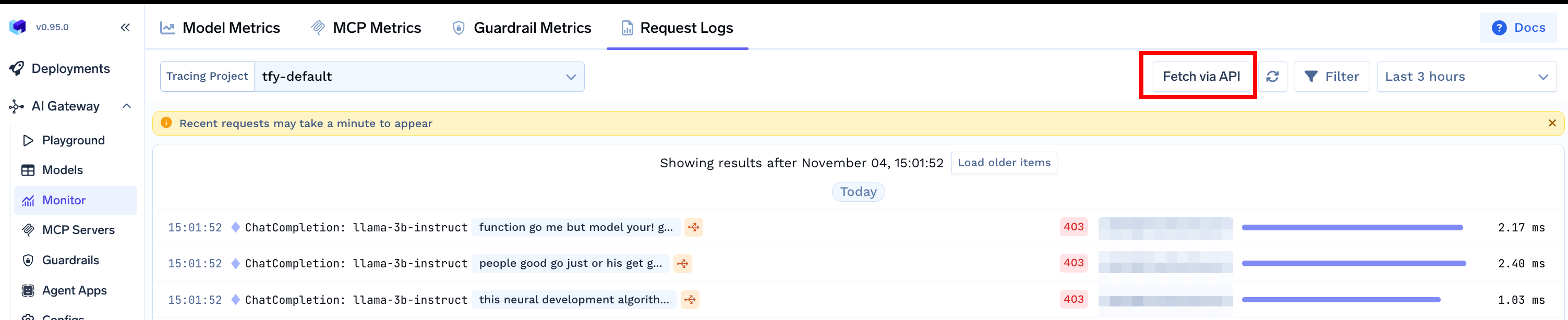
tracing_project_fqn from the Fetch via API button on the Request Logs pageDeep Dive: Inspect a Single Trace
Now that you’ve run a basic query, inspect one request end-to-end. The examples below fetch all spans for a specifictrace_id, so you can see the full hierarchy (root request, guardrail processing, model span, and outbound HTTP calls).

Span Hierarchy Breakdown
The following example demonstrates a complete trace with 5 spans that form a hierarchical relationship. Each span represents a different phase of the request processing, from the initial chat completion request through guardrail processing to the final model inference and network calls.ChatCompletion Span (Root Span)
ChatCompletion Span (Root Span)
The ChatCompletion span with ID
bddb6503c0eeb940 serves as the root span with no parent span ID (empty parent_span_id).
This span represents the complete chat completion request lifecycle from the client’s perspective, capturing the total time from when the request enters the gateway until the response is sent back to the client.
With a duration of 7.09 seconds, it provides the overall performance measurement for the entire request flow.
The span includes the tfy.triggered_guardrail_fqns attribute showing which guardrails were triggered during processing.Guardrail Span
Guardrail Span
The Guardrail span with ID
d46e8d5202edc22c has a parent span “ChatCompletion Span (Root Span)” with ID bddb6503c0eeb940, representing the PII redaction guardrail processing.
This span shows the guardrail configuration used.Guardrail Network Call Span
Guardrail Network Call Span
The Guardrail Network Call span with ID
fb07005b3c28a98b has a parent span “Guardrail Span” with ID d46e8d5202edc22c, representing the actual HTTP communication with the external guardrail service (AWS Bedrock). This span captures the network latency and external guardrail service processing time. With a duration of 0.48 seconds, it shows the time spent on the actual guardrail API call.Model Span
Model Span
The Model span with ID
de09be32ba8e0c37 has a parent span “ChatCompletion Span (Root Span)” with ID bddb6503c0eeb940, making it a sibling to the Guardrail span.
This span contains all the detailed model metrics and represents the LLM model inference processing within the gateway.
Notice how the input content has been redacted from I am sateesh. Hi to I am {NAME}. Hi, demonstrating the PII redaction working.Model Network Call Span
Model Network Call Span
The Model Network Call span with ID
95794dcfbaad832a has a parent span “Model Span” with ID de09be32ba8e0c37, representing the actual HTTP communication with the external provider (OpenAI). This span captures pure network latency and external provider processing time. With a duration of 6.60 seconds, it shows the time spent on the actual API call to the external service.Filter Request Logs
While fetching all Gateway request logs is useful for general monitoring, you’ll often want to filter logs based on specific criteria such as user identity, model names, etc. You can achieve this using thefilters parameter in the query_spans method.
The API supports the following common filter types:
- Span fields filtering: Filter logs by span fields such as
spanName,traceId,spanId, etc. See the Query Spans documentation to understand the supported options forspanFieldNameandoperator. - Span attributes filtering: Filter logs by span attributes, e.g., using
tfy.model.namefor model name. See Attributes section to understand the supported options forspanAttributeKey - Gateway request metadata filtering: Filter logs based on Custom Metadata keys and values that you passed to Gateway requests.
Common Use Cases
Fetch all spans for a time interval
Fetch all spans for a time interval
Define the time range for your query. Use ISO 8601 format for timestamps.
Fetch all Root spans for a time interval
Fetch all Root spans for a time interval
A root span is the top-level span in a trace hierarchy that has no parent span.Define the time range for your query. Use ISO 8601 format for timestamps.
Fetch all spans for virtual accounts
Fetch all spans for virtual accounts
Define the time range for your query. Use ISO 8601 format for timestamps.
Fetch all spans for a virtual account `exampleaccount`
Fetch all spans for a virtual account `exampleaccount`
Define the time range for your query. Use ISO 8601 format for timestamps.
Fetch all spans for users
Fetch all spans for users
Define the time range for your query. Use ISO 8601 format for timestamps.
Fetch all spans for a user with email example@email.com
Fetch all spans for a user with email example@email.com
Define the time range for your query. Use ISO 8601 format for timestamps.
Filter by Specific Trace ID
Filter by Specific Trace ID
Fetch spans of a specific traceId
Fetch all model spans
Fetch all model spans
Filter spans by model spanType using the
tfy.span_type span attribute filter with value Model.Fetch requests with Gateway request metadata
Fetch requests with Gateway request metadata
Filter spans based on custom metadata keys and values that were passed to Gateway requests using the
X-TFY-METADATA header.Fetch spans with MCP in span name
Fetch spans with MCP in span name
Filter spans that have
MCP in the span name.Filter model spans by model name
Filter model spans by model name
Fetch model spans by filtering with
tfy.span_type span attribute filter with value Model, and then further filter by model name using the tfy.model.name span attribute filter.Understanding Span Attributes
Each span you query from LLM Gateway captures key request and model details. Recognizing these attributes helps you analyze and debug usage effectively.Core Span Attributes
| Attribute | Description |
|---|---|
tfy.span_type | Type of span, with possible values: • "ChatCompletion" - Complete chat request lifecycle• "Completion" - Text completion requests without chat context• "MCP" - Model Context Protocol server interactions and tool calls• "Rerank" - Document reranking operations for search relevance• "Embedding" - Vector embedding generation operations• "Model" - Actual LLM model inference processing• "AgentResponse" - Multi-tool agent orchestration workflows• "Guardrail" - Safety, compliance, and content validation checks |
tfy.input | Complete input data sent to the model, mcp_server, guardrail, etc.. |
tfy.output | Complete output response from the model, mcp_server, guardrail, etc.. |
tfy.input_short_hand | Abbreviated version of the input for display purposes |
tfy.error_message | Error message if the request failed |
tfy.prompt_version_fqn | FQN of the prompt version used (if applicable) |
tfy.prompt_variables | Variables used in prompt templating |
tfy.triggered_guardrail_fqns | List of guardrails that were triggered during the request |
Request Context Attributes
| Attribute | Description |
|---|---|
tfy.request.model_name | Name of the model that was requested |
tfy.request.created_by_subject | Subject (user/service account) that made the request |
tfy.request.created_by_subject_teams | Teams associated with the requesting subject |
tfy.request.metadata | Additional metadata associated with the request (e.g., {'foo': 'bar'}) |
tfy.request.conversation_id | Unique identifier for the conversation (if part of a chat) |
Model Attributes
| Attribute | Description |
|---|---|
tfy.model.id | Unique identifier of the model |
tfy.model.name | Display name of the model |
tfy.model.fqn | Fully qualified name of the model |
tfy.model.request_url | URL endpoint used for the model request |
tfy.model.streaming | Whether the request used streaming mode |
tfy.model.request_type | Type of request (e.g., "ChatCompletion", "Completion", "Embedding", "Rerank", "AgentResponse", "MCPGateway", "CreateModelResponse") |
tfy.model.metric.cache_read_input_tokens | Number of input tokens served from the cache, billed at a lower cache read rate instead of the standard input rate |
tfy.model.metric.cache_creation_input_tokens | Number of input tokens written to the cache, billed at a higher cache write rate to cover the cost of storage |
Model Performance Metrics
| Attribute | Description |
|---|---|
tfy.model.metric.time_to_first_token_in_ms | Time taken to receive the first token (streaming) |
tfy.model.metric.latency_in_ms | Total request latency in milliseconds |
tfy.model.metric.input_tokens | Number of tokens in the model input |
tfy.model.metric.output_tokens | Number of tokens in the model output |
tfy.model.metric.cost_in_usd | Cost of the request in USD |
tfy.model.metric.inter_token_latency_in_ms | Average latency between tokens (streaming) |
Load Balancing Attributes
| Attribute | Description |
|---|---|
applied_loadbalance_rule_ids | IDs of load balancing rules that were applied (e.g., ['gpt-4-dev-load']) |
Budget Control Attributes
| Attribute | Description |
|---|---|
applied_budget_rule_ids | IDs of budget rules that were applied to this request (e.g., ['virtualaccount1-monthly-budget']) |
Rate Limiting Attributes
| Attribute | Description |
|---|---|
applied_ratelimit_rule_ids | IDs of all rate limiting rules that were applied (e.g., ['virtualaccount1-daily-ratelimit']) |
MCP (Model Context Protocol) Server Attributes
| Attribute | Description |
|---|---|
tfy.mcp_server.id | Unique identifier of the MCP server |
tfy.mcp_server.name | Display name of the MCP server |
tfy.mcp_server.url | URL endpoint of the MCP server |
tfy.mcp_server.fqn | Fully qualified name of the MCP server |
tfy.mcp_server.server_name | Internal name of the MCP server |
tfy.mcp_server.method | MCP method that was called |
tfy.mcp_server.primitive_name | Name of the MCP primitive used |
tfy.mcp_server.error_code | Error code if the MCP call failed |
tfy.mcp_server.is_tool_call_execution_error | Whether the error was from tool call execution |
MCP Server Metrics
| Attribute | Description |
|---|---|
tfy.mcp_server.metric.latency_in_ms | Latency of the MCP server call in milliseconds |
tfy.mcp_server.metric.number_of_tools | Number of tools available in the MCP server |
Guardrail Attributes
| Attribute | Description |
|---|---|
tfy.guardrail.id | Unique identifier of the guardrail |
tfy.guardrail.name | Display name of the guardrail |
tfy.guardrail.fqn | Fully qualified name of the guardrail |
tfy.guardrail.result | Result of the guardrail check (e.g., 'pass', 'mutate', 'flag') |
Guardrail Applied Entity Attributes
| Attribute | Description |
|---|---|
tfy.guardrail.applied_on_entity.type | Type of entity the guardrail was applied to |
tfy.guardrail.applied_on_entity.id | ID of the entity |
tfy.guardrail.applied_on_entity.name | Name of the entity |
tfy.guardrail.applied_on_entity.fqn | FQN of the entity |
tfy.guardrail.applied_on_entity.scope | Scope of the entity |
Guardrail Metrics
| Attribute | Description |
|---|---|
tfy.guardrail.metric.latency_in_ms | Time taken for the guardrail check in milliseconds |
HTTP Response Attributes
| Attribute | Description |
|---|---|
http.response.status_code | HTTP status code of the response |