

- Control cost per developer/team/application: Its really easy to blow up cost in LLMs because of a bug in the code somewhere or an agent stuck in an infinite loop. Hence, a good safety measure is to limit the cost per developer/team/application so that we don’t incur such costly mistakes.
- Rate limit self-hosted LLMs: Often times, companies deploy models on their own GPUs (on-prem or cloud). However, we do want to burst to the cloud per-token API calls in case there is a sudden surge in traffic, and there are not enough GPUs left to serve the requests on-prem. In this case, to avoid overwhelming the on-prem GPU, its good to setup a rate limit on the on-prem LLM.
- Rate limit your customers based on their tier: Many products have different tiers of customers, each with a different limit on LLM usage. This can be directly modeled using a rate limit configuration where in they can set a limit per customer.
Configure Rate Limiting in TrueFoundry AI Gateway
Using the rate limiting feature, you can rate limit requests to a specified tokens/requests per minute/hour/day for certain sets of requests. The rate limiting configuration is defined as a YAML file which has the following fields:- name: The name of the rate limiting configuration - it can be anything, and is only used for reference in logs.
- type: This should be
gateway-rate-limiting-config. It helps TrueFoundry identify that this is a rate limiting configuration file. - rules: An array of rules.
Requests that fail also consume quota. Any request the AI Gateway rejects or that the provider fails (
4XX/5XX) counts as one request against every requests_per_* rule it matches. The only exception is a request already rejected with a 429 by rate limiting itself, which is not counted. Token-based limits (tokens_per_*) are unaffected, since a failed request reports no tokens.Migration from Dynamic Rule IDs (Breaking Changes)
Migration from Dynamic Rule IDsIf you’re using the old dynamic rule ID format with New Format:Migration Steps:
{} placeholders (e.g., {user}-daily-limit, {model}-hourly-limit), you need to migrate to the new format:Old Format (Deprecated):- Remove
{}placeholders from the ruleid(make it static) - Add
rate_limit_applies_perfield with the appropriate scope value(s) - Select from:
user,model,virtualaccount, ormetadata.*(replace*with your metadata key)
-
{user}-daily-limit→id: 'user-daily-limit'+rate_limit_applies_per: ['user'] -
{model}-hourly-limit→id: 'model-hourly-limit'+rate_limit_applies_per: ['model'] -
{user}-{model}-daily-limit→id: 'user-model-daily-limit'+rate_limit_applies_per: ['user', 'model'] -
project-{metadata.project_id}-limit→id: 'project-limit'+rate_limit_applies_per: ['metadata.project_id']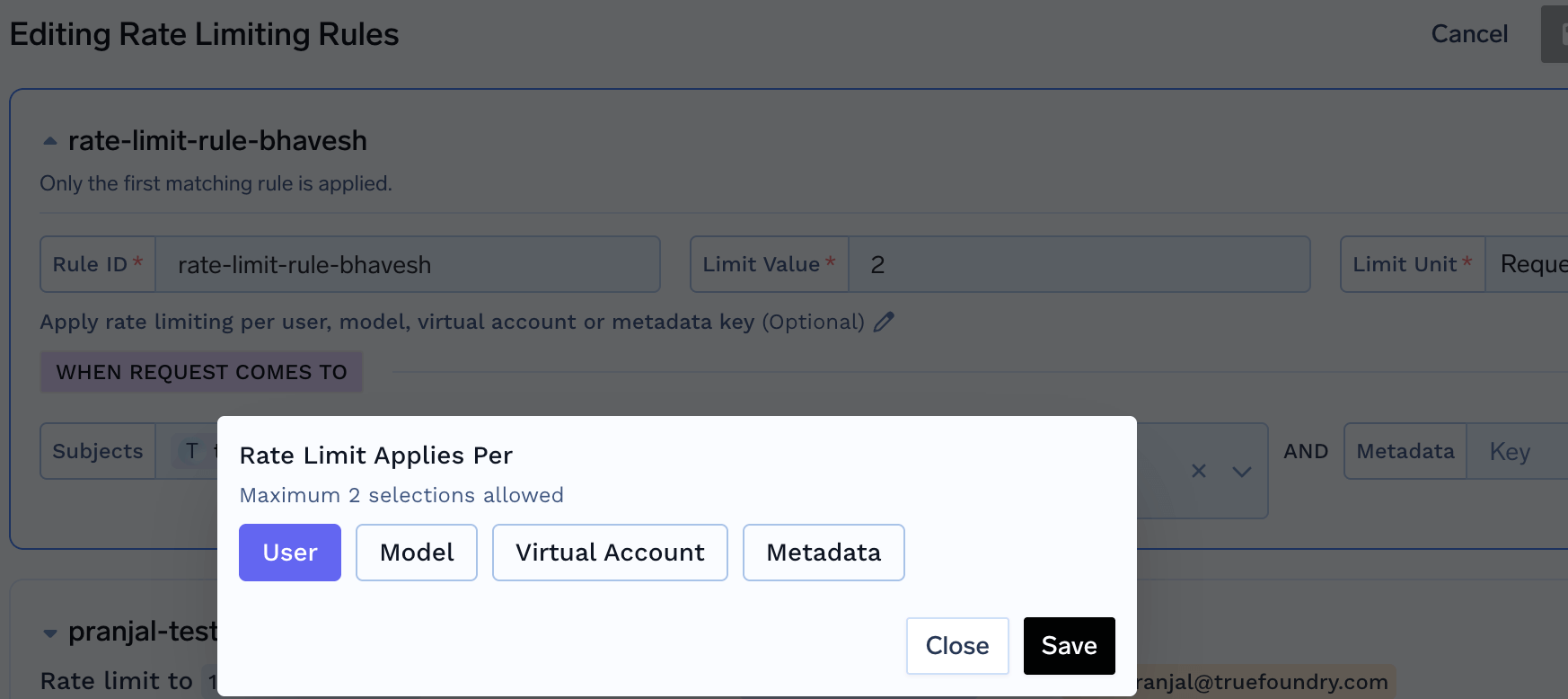
- id: A unique identifier for the rule. Used in logs, metrics, and API responses.
- when (Define the subset of requests on which the rule applies): TrueFoundry AI Gateway provides a very flexible configuration to define the exact subset of requests on which the rule applies. We can define based on the user calling the model, or the model name or any of the custom metadata key present in the request header
X-TFY-METADATA. The subjects, models and metadata fields are conditioned in an AND fashion - meaning that the rule will only match if all the conditions are met. If an incoming request doesn’t match the when block in one rule, the next rule will be evaluated.subjects: Filter based on the list of users / teams / virtual accounts calling the model. User can be specified usinguser:john-doeorteam:engineering-teamorvirtualaccount:acct_1234567890.models: Rule matches if the model name in the request matches any of the models in the list.metadata: Rule matches if the metadata in the request matches the metadata in the rule. For e.g., if we specifymetadata: {environment: "production"}, the rule will only match if the request has the metadata keyenvironmentwith valueproductionin the request headerX-TFY-METADATA.
- limit_to: Integer value which along with unit specifies the limit (for e.g., 100000 tokens per minute).
- unit: Possible values are requests_per_minute, requests_per_hour, requests_per_day, tokens_per_minute, tokens_per_hour, tokens_per_day.
- rate_limit_applies_per (Optional): Creates separate rate limit instances for each unique value of the specified entity or combination of entities. This allows you to set individual rate limits for each user, model, or other entity without creating separate rules.
Replaces Dynamic Rule IDs: This field replaces the old dynamic rule ID format (e.g.,
{user}-daily-limit, {user}-{model}-limit). Use static rule IDs with rate_limit_applies_per instead.Without rate_limit_applies_per: One rate limit applies to all matching requests- Example: All users collectively share a 1000 requests/minute limit
With rate_limit_applies_per: ['user']: A separate rate limit is created for each user- Example: User Alice has 1000 requests/minute, User Bob has a separate 1000 requests/minute
With rate_limit_applies_per: ['model']: A separate rate limit is created for each modelWith rate_limit_applies_per: ['user', 'model']: A separate rate limit is created for each user-model combination- Example: Alice using GPT-4 has 1000 req/min, Alice using Claude has a separate 1000 req/min, Bob using GPT-4 has a separate 1000 req/min
With rate_limit_applies_per: ['metadata.project_id']: A separate rate limit is created for each project ID value
user- One rate limit per uservirtualaccount- One rate limit per virtual accountmodel- One rate limit per modelmetadata.*- One rate limit per custom metadata value (replace*with your metadata key)
Example: If you set
limit_to: 1000, unit: requests_per_minute, and rate_limit_applies_per: ['user', 'model']:- User Alice calling GPT-4 has 1000 requests/minute
- User Alice calling Claude-3 has a separate 1000 requests/minute
- User Bob calling GPT-4 has a separate 1000 requests/minute
- Each user-model combination’s usage is tracked independently
- Limit all requests to gpt4 model from openai-main account for user:bob@email.com to 1000 requests per day
- Limit all requests to gpt4 model for team:backend to 20000 tokens per minute
- Limit all requests to gpt4 model for virtualaccount:virtualaccount1 to 20000 tokens per minute
- Limit each model to have a limit of 1000000 tokens per day (using
rate_limit_applies_per: ['model']) - Limit each user to have a limit of 1000000 tokens per day (using
rate_limit_applies_per: ['user']) - Limit each user to have a limit of 1000000 tokens per day for each model separately (using
rate_limit_applies_per: ['user', 'model']) - Limit each project (identified by custom metadata) to 50000 tokens per hour (using
rate_limit_applies_per: ['metadata.project_id'])
Configure Rate Limiting on AI Gateway
It’s straightforward—simply go to the Config tab in the AI Gateway, add your configuration, and save.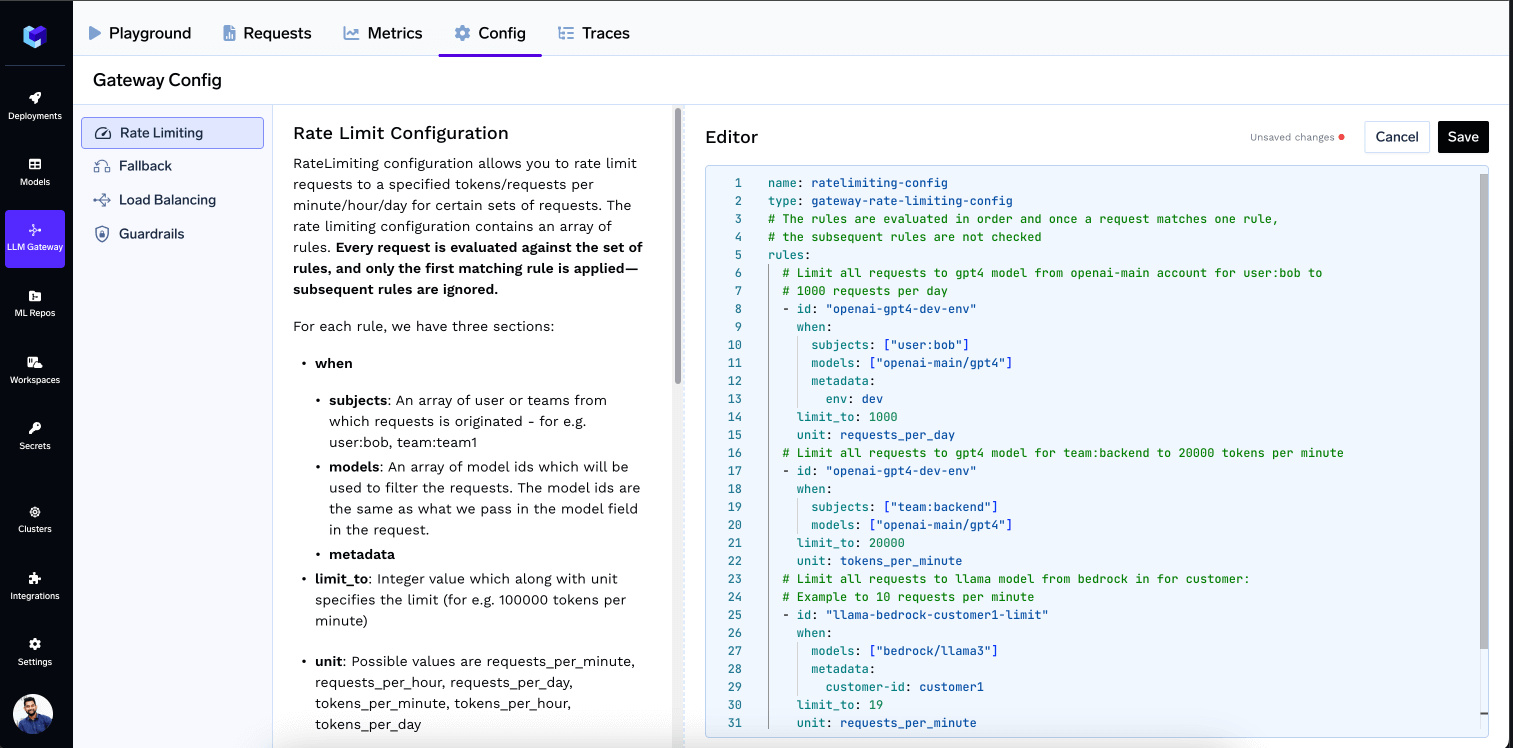
How does the AI Gateway do Rate Limiting?
The AI Gateway uses a sliding window algorithm to enforce rate limiting. Since the minimum unit of rate limiting is on a per-minute window for LLM traffic, the AI Gateway maintains a sliding window of 60 seconds to track the number of requests. The AI Gateway maintains time-based buckets for each user, model, team, or any other custom segment defined by the user in the load balancing and/or rate limiting configs for every 10 seconds. So to calculate the counter over the 60-second window, it sums up the requests or tokens in the last 6 buckets. The older buckets are removed from the sliding window. The AI Gateway then checks if the request is within the limit. If it is, the request is forwarded to the model. If it is not, the request is rejected with an error.Rate limit exceeded response
When a request exceeds a rate limit, the AI Gateway returns HTTP429:
x-tfy-applied-rules header naming the rule that was violated: