

What is Virtual MCP Server?
The Virtual MCP Server enables you to combine tools from multiple MCP servers into a single, curated MCP server that your application can connect to.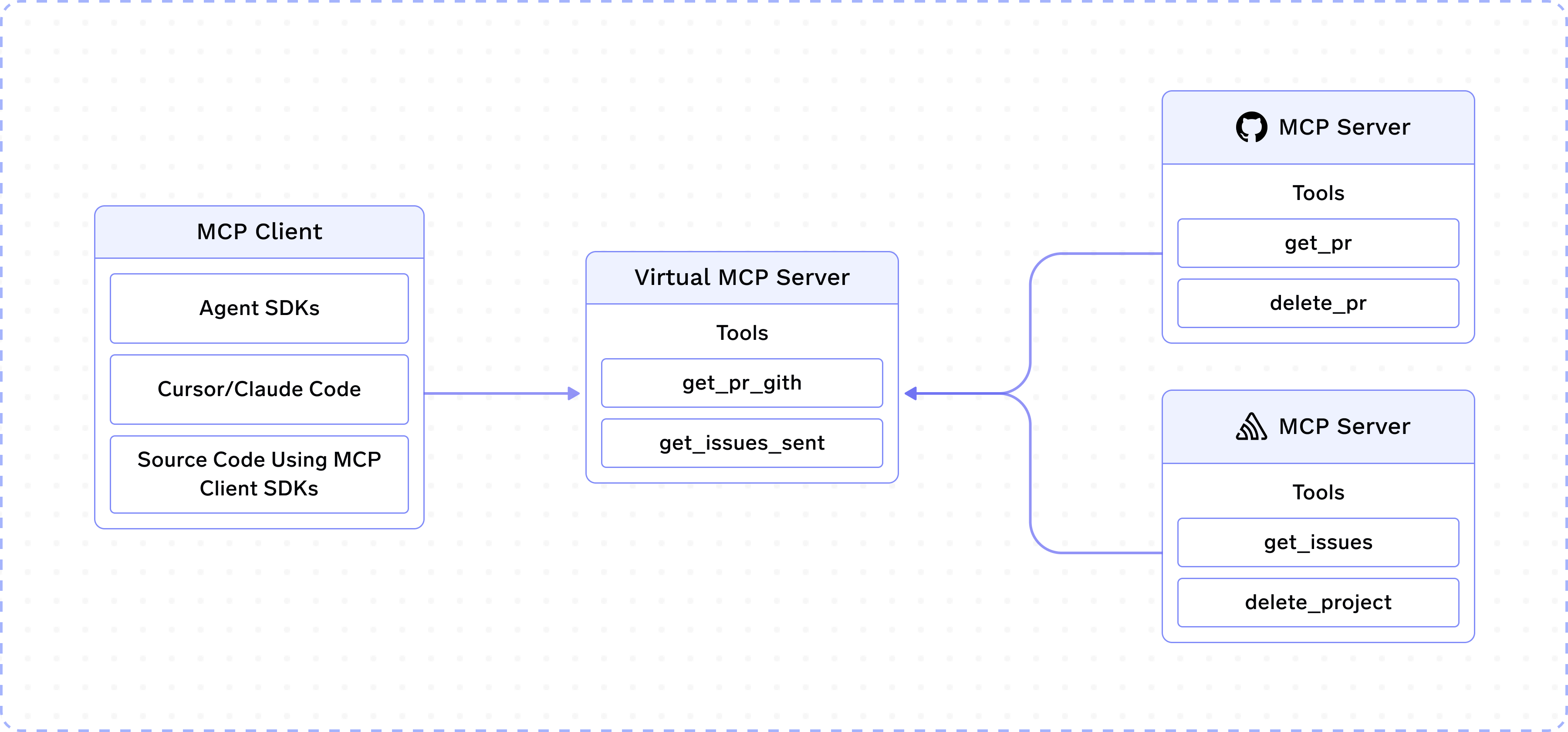
delete_project, delete_pr, etc.
As the name suggests, Virtual MCP Server allows you to create a new MCP server by taking a subset of safe tools from GitHub and Slack MCP servers. This new Virtual MCP server can be accessed like any other remote MCP server and does not require a deployment.
How to create a Virtual MCP Server?
When you create or edit a Virtual MCP Server, set Name as the unique identifier (used in URLs and API references) and optionally set Display Name. Display Name is the human-readable label shown throughout the MCP registry — including the MCP servers page and the tool selector — instead of the internal name. If you omit it, Name is shown.
How are tool names decided?
Tools keep their original name with a short, stable server identifier appended:<original_tool_name>_<server_identifier>, where the identifier is the first 5 characters of the source server’s name plus the last 2 characters of its ID (for example, create_issue from github becomes something like create_issue_githua3). This keeps tools from different servers unique while leaving the original name, the LLM’s main signal for picking a tool, intact. Encoded names are capped at 64 characters, half the 128 the MCP spec recommends, so tool names longer than 56 characters are truncated.
Best Effort Mode
By default, if any source MCP server backing the virtual server is unreachable or fails (for example, while listing tools), requests to the virtual server fail as a whole. Enabling the Best Effort Mode toggle when creating or editing the virtual server changes this behavior: the virtual server continues with the source servers that are available, so clients still get tools from the healthy servers, while tools from the failed servers are simply unavailable until those servers recover. The toggle is off by default.Frequently Asked Questions
How do I pass through custom headers?
How do I pass through custom headers?
You can use
x-tfy-mcp-headers to pass custom headers, which will be passed to the remote MCP servers backing the virtual server.For MCP Gateway (direct MCP server access):Does Virtual MCP Server require a new deployment?
Does Virtual MCP Server require a new deployment?
The Virtual MCP server is managed by the MCP Gateway and does not require a new deployment.
What MCP server features are supported by Virtual MCP Server?
What MCP server features are supported by Virtual MCP Server?
For now, only listing and calling tools are allowed. Progress notifications that a backing server sends during a tool call are relayed to your client when the request includes a
progressToken. See MCP Protocol Support for the full feature and transport matrix.