

Guardrail Rules UI
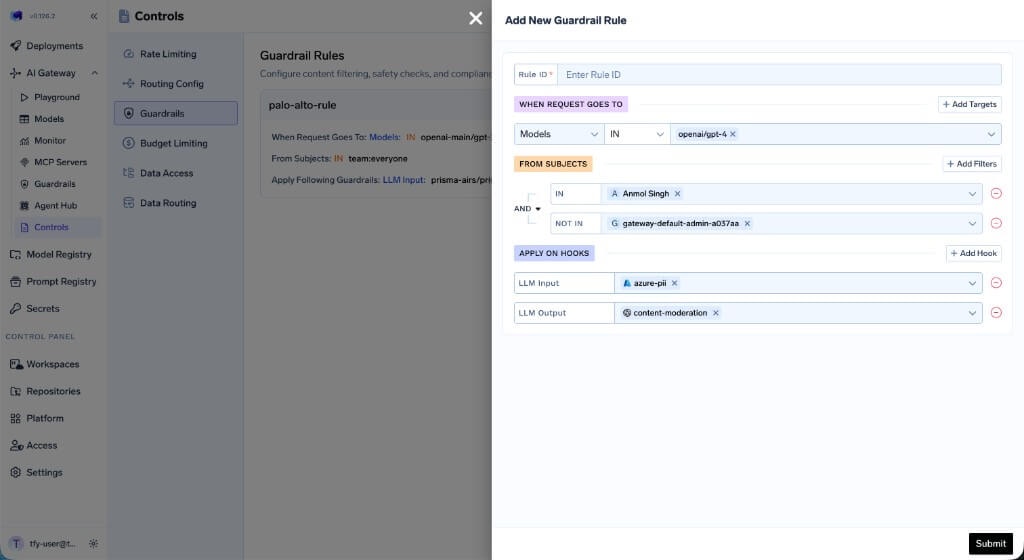
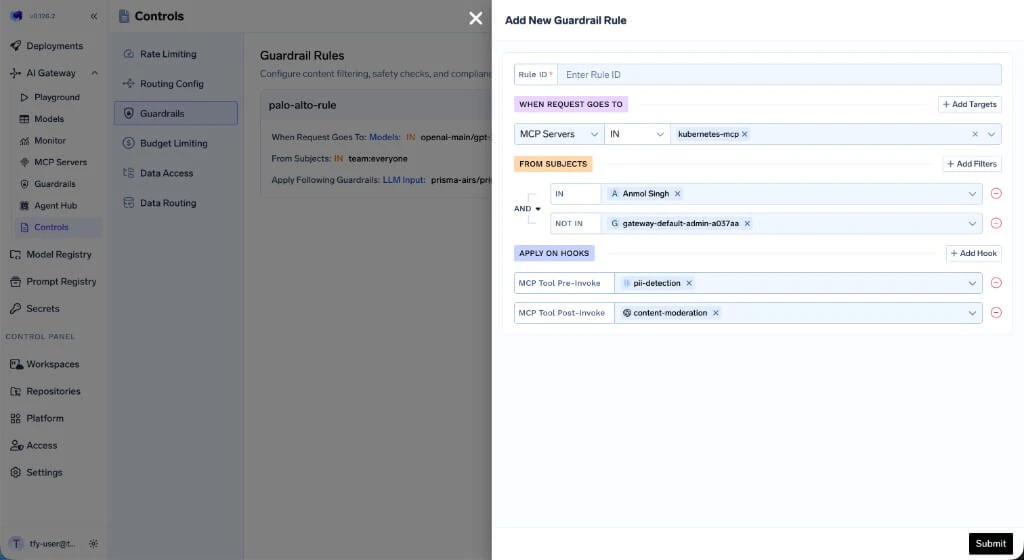
Navigate to AI Gateway → Controls → Guardrails to view and manage guardrail rules. Click Add Rule to create a new rule. Each rule has three sections:- WHEN REQUEST GOES TO — Define which models or MCP servers this rule applies to.
- FROM SUBJECTS — Specify which users or teams the rule targets, with
INandNOT INconditions. - APPLY ON HOOKS — Select which hooks to apply guardrails on and choose the guardrail integration for each hook.
- Model Target Rule
- MCP Server Target Rule
Configuration Structure
The guardrails configuration contains an array of rules that are evaluated for each request. All matching rules are evaluated, and the union of their guardrails is applied to the request. This means if multiple rules match, the guardrails from every matching rule are combined together. Each rule can specify guardrails for any of the four hooks.Example Configuration
- palo-alto-rule — Targets requests to
openai-main/gpt-3-5-turbo-16kfromteam:everyone, applying Prisma AIRS guardrails on both LLM input and output. - mcp-test-rule — Targets requests to the
kubernetes-mcpMCP server fromteam:test-team(excluding a specific user), applying PII detection before tool invocation and Prisma AIRS after.
Configuration Reference
Rule Structure
| Field | Required | Description |
|---|---|---|
id | Yes | Unique identifier for the rule |
when | Yes | Matching criteria with target and subjects blocks |
llm_input_guardrails | Yes | Guardrails applied before LLM request (use [] if none) |
llm_output_guardrails | Yes | Guardrails applied after LLM response (use [] if none) |
mcp_tool_pre_invoke_guardrails | Yes | Guardrails applied before MCP tool invocation (use [] if none) |
mcp_tool_post_invoke_guardrails | Yes | Guardrails applied after MCP tool returns (use [] if none) |
custom_error_message | No | Custom message returned to the client when a guardrail in this rule blocks a request. Supports the {{guardrail_message}} placeholder. |
The when Block
The when block contains two main sections: target (what the request targets) and subjects (who is making the request):
| Section | Description |
|---|---|
target | Defines conditions based on model, mcpServers, mcpTools, or metadata |
subjects | Defines conditions based on users, teams, or virtual accounts |
If
when is empty ({}), the rule matches all requests. Use this for baseline guardrails that should apply universally alongside any other matching rules.The when Block Structure
Target: Match by MCP Servers
Target: Match by MCP Servers
Target: Match by Models
Target: Match by Models
Target: Match by Metadata
Target: Match by Metadata
X-TFY-METADATA: {"environment": "production", "tier": "enterprise"}Target: Match by Specific MCP Tool
Target: Match by Specific MCP Tool
Subjects: Users with IN/NOT IN
Subjects: Users with IN/NOT IN
Combined Target and Subjects
Combined Target and Subjects
target and subjects conditions must match for the rule to apply.- All rules are evaluated for every request. The guardrails from all matching rules are combined (union) and applied together.
- Each rule can target specific users, teams, models, metadata, or MCP servers, and can enforce different guardrails on any combination of hooks.
- If multiple rules match, their guardrails are merged per hook — for example, if Rule A applies PII detection on LLM input and Rule B applies prompt injection detection on LLM input, both guardrails will run.
- Omitted fields are not used for filtering (e.g., if
modelis not specified, the rule matches any model).
How to Get the Guardrail Selector
You can get the selector (FQN) of guardrail integrations by navigating to the Guardrail tab on AI Gateway and clicking on the “Copy FQN” button next to the guardrail integration.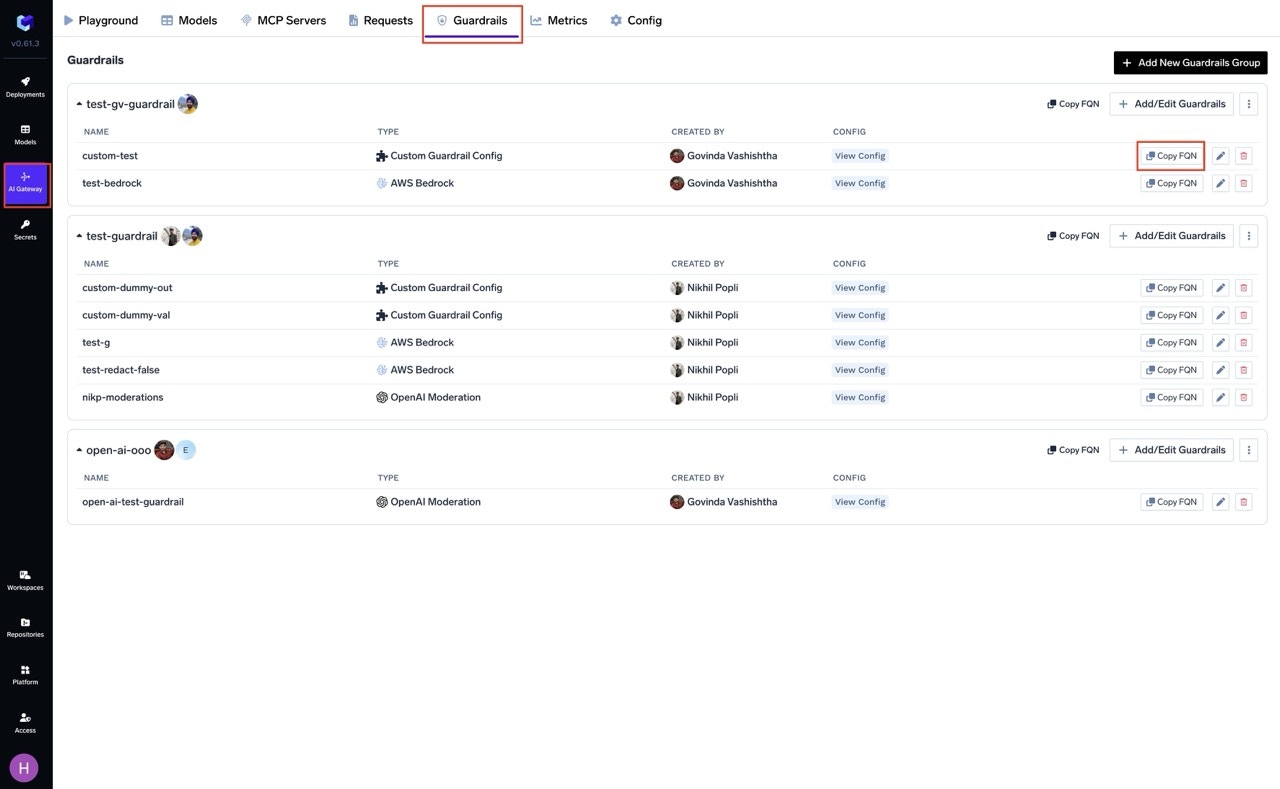
- LLM chat/completion requests (LLM Input/Output hooks)
- MCP tool invocations (MCP Pre/Post Tool hooks)