Auth Overrides let you replace an MCP server’s default outbound credentials with user-specific tokens. When an override exists for the caller, the Gateway uses that value instead of the server’s configured defaults for upstream requests.
Adding an Auth Override
Open the Auth Overrides tab
Navigate to the MCP server detail page and click the Auth Overrides tab.
Click Add Override
Click the + Add Override button in the top right corner.
Configure the override
- Subject — only MCP Server Managers can change this. As a Manager, select the user or virtual account the override applies to. If you’re a non-manager user of the MCP server, the subject is fixed to you and cannot be changed.
- Credential — what you enter depends on how the MCP server’s outbound auth is configured:
- Templated header (per-user API key) — the MCP server is configured with a placeholder, e.g.
Authorization: Bearer {{API_KEY}}. Enter only the value that goes inside {{...}} — the Gateway substitutes it into the template at request time.
- Non-templated header — enter the complete header value exactly as the upstream service expects it in the
Authorization header.
Example:| MCP server’s auth header config | What you enter | What the Gateway sends |
|---|
Authorization: Bearer {{API_KEY}} (templated) | sk-abc123 | Authorization: Bearer sk-abc123 |
Authorization (non-templated) | Bearer sk-abc123 | Authorization: Bearer sk-abc123 |
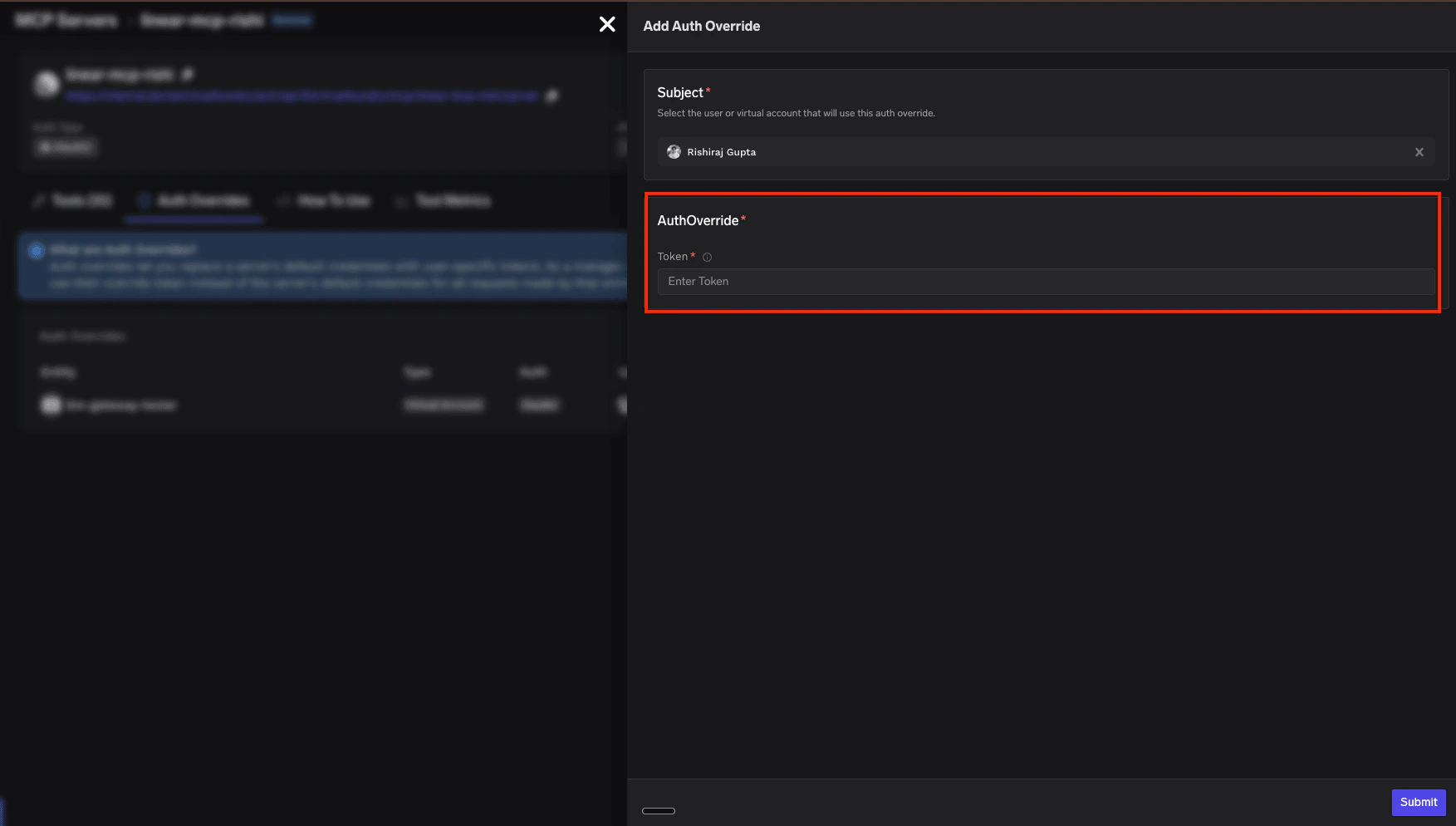
Submit
Click Submit to save the override. The Gateway will now use this credential for all requests made by the selected subject.
Managing Auth Overrides
The Auth Overrides tab on the MCP server detail page lists all existing overrides:
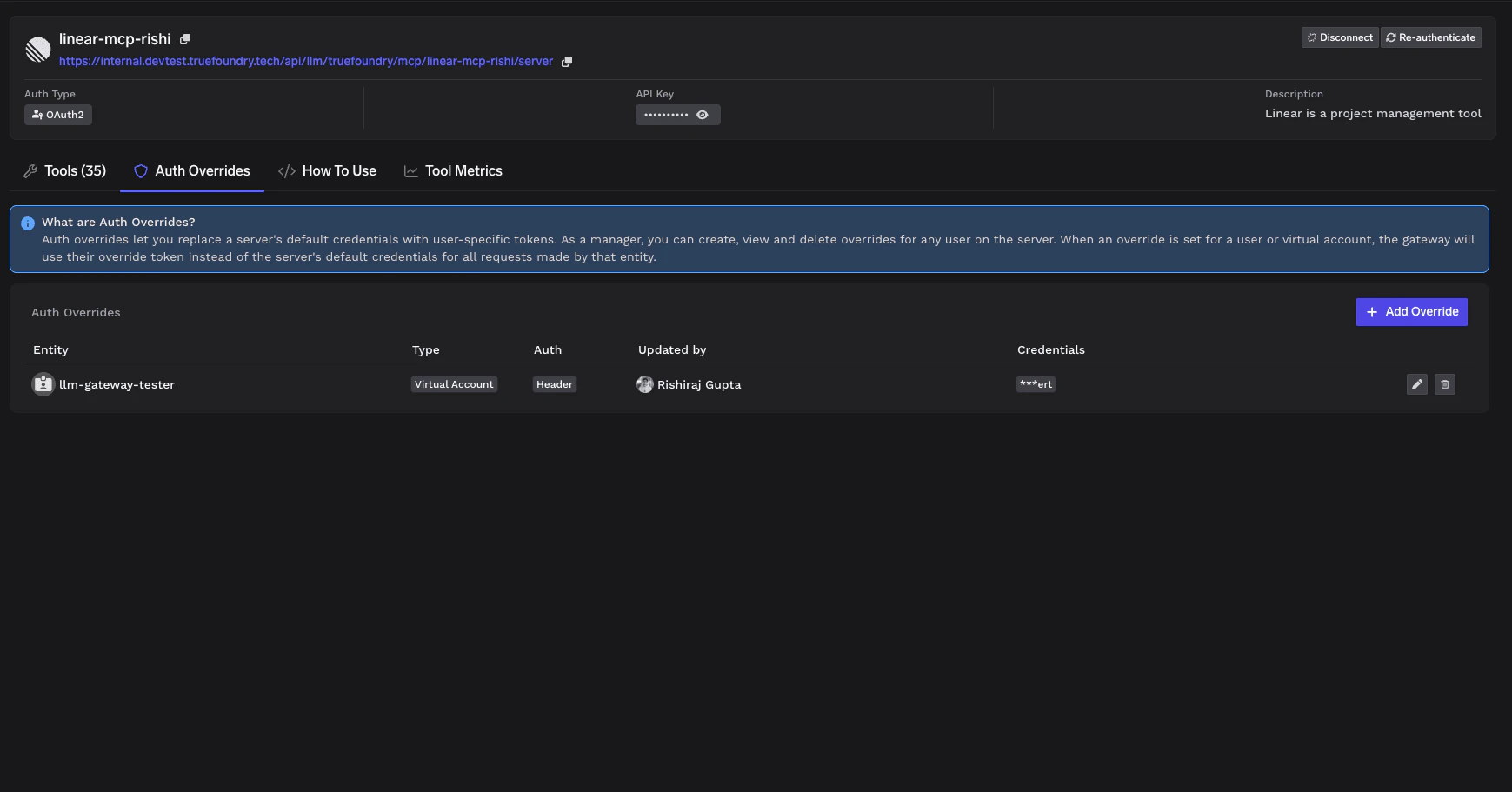 The table has the following columns:
| Column | Description |
|---|
| Entity | The user or virtual account the override applies to |
| Type | Whether the entity is a user or virtual account |
| Auth | The authentication type being overridden |
| Updated by | Who last modified this override |
| Credentials | The masked credential value |
Who can manage Auth Overrides
| Action | MCP Server Manager | MCP Server User (non-manager) |
|---|
| Open the Auth Overrides tab | Yes | Yes |
| List overrides | All overrides | Only overrides they added |
| Add an override | Yes (for any subject) | Only for API Key — Individual Credentials, for themselves |
| Edit an override | Any override | Only their own |
| Delete an override | Any override | Only their own |
Which MCP servers support Auth Overrides
Auth Override availability depends on the MCP server’s outbound authentication mode. Use the table below to check whether your server supports overrides and who can add them.
| Outbound auth (MCP server) | Override support | Who can add the override |
|---|
| API Key — Individual Credentials | Supported | Managers (for any subject) and users (for themselves) |
| API Key — Shared Credentials | Coming soon | — |
| OAuth2 — Authorization Code | Supported | Managers only |
| OAuth2 — Client Credentials | Coming soon | — |
| Token Passthrough | Not supported | — |
| No Auth | Not applicable | — |
For details on configuring API Key authentication with Shared or Individual Credentials, see the Getting Started guide. Whose authentication can be overridden
When an override is supported, it can be applied to one of the following subjects on the MCP server:
| Subject | Override support | Who can add the override |
|---|
| TrueFoundry user | Supported | Managers (any user) or the user themselves |
| Virtual account | Supported | Managers only |
| Identity Provider token | Coming soon | — |
How Auth Overrides work at runtime
When a user makes a request through the Gateway to an MCP server with Auth Overrides configured:
- The Gateway authenticates the user (inbound authentication).
- The Gateway checks if an Auth Override exists for this user on this MCP server.
- If an override exists: The Gateway injects the user’s override credentials into the request (template substitution for Individual, or full
Authorization value when applicable).
- If no override exists: The Gateway uses the server’s default credentials (for Shared Credentials) or returns an error (for Individual Credentials).
For MCP servers configured with Individual Credentials, users without an Auth Override will not be able to use the server until an override is created for them.
Effect of outbound auth changes on existing overrides
When an MCP Server Manager changes the server’s outbound auth configuration, existing overrides may be deleted, preserved, or invalidated depending on the kind of change.
Switching outbound auth mode
| Before (current outbound auth) | After (new outbound auth) | Effect on existing overrides |
|---|
| API Key — Individual | API Key — Shared | Deleted. Shared mode does not use per-user overrides. |
| API Key — Shared | API Key — Individual | N/A — Shared mode had no overrides. Each user must add their own override before they can use the server. |
| API Key (any) | OAuth2 (any) | Deleted. API Key headers and OAuth2 tokens are incompatible storage formats. |
| OAuth2 (any) | API Key (any) | Deleted. Same reason — incompatible storage formats. |
| OAuth2 — Authorization Code | OAuth2 — Client Credentials | Deleted. Per-user OAuth tokens are not used in the Client Credentials flow. |
| OAuth2 — Client Credentials | OAuth2 — Authorization Code | N/A. Client Credentials does not store per-user overrides. Each user must complete OAuth consent before they can use the server. |
| Any mode | Token Passthrough or No Auth | Deleted. Neither destination mode uses per-user overrides. |
| Token Passthrough or No Auth | Any mode | N/A. No overrides existed. |
Tweaking settings within the same mode
| Change | Effect on existing overrides |
|---|
Renaming the {{...}} placeholder in an API Key — Individual template (e.g., {{API_KEY}} → {{TOKEN}}) | Preserved. The override stores the raw value; it is substituted into the new placeholder name automatically. |
Changing the client_id / client_secret for an OAuth2 server | Preserved but invalidated. Existing OAuth tokens were issued by the old OAuth app registration; users will hit McpAuthRequiredError on the next request and must re-complete OAuth consent. |
After a change that deletes overrides, affected users (or the Manager on their behalf) need to add the override again before they can use the server.

