

What is Azure Prompt Shield?
Azure Prompt Shield is Microsoft’s AI-powered service for detecting prompt injection attacks and jailbreak attempts. It is part of the Azure AI Content Safety suite.Key Features of Azure Prompt Shield
- User Prompt Attack Detection: Identifies direct prompt injection attempts in user messages, including jailbreak techniques that try to override system instructions or manipulate model behavior.
- Document Attack Detection: Detects indirect prompt injection attacks embedded in document content or context provided to the model — catching attacks that attempt to hijack the model through injected instructions in external data.
How to Set Up Azure Prompt Shield on Azure
Sign in to Azure Portal
Navigate to Azure Portal and sign in with your Azure credentials.
Create a Content Safety Resource
Select Create a resource and search for Azure AI Content Safety. Select Create.
Configure Resource Details
- Subscription: Choose your Azure subscription
- Resource group: Select existing or create new
- Region: Select the region (e.g., East US)
- Name: Enter a unique name for your Content Safety resource
- Pricing tier: Choose the appropriate pricing tier
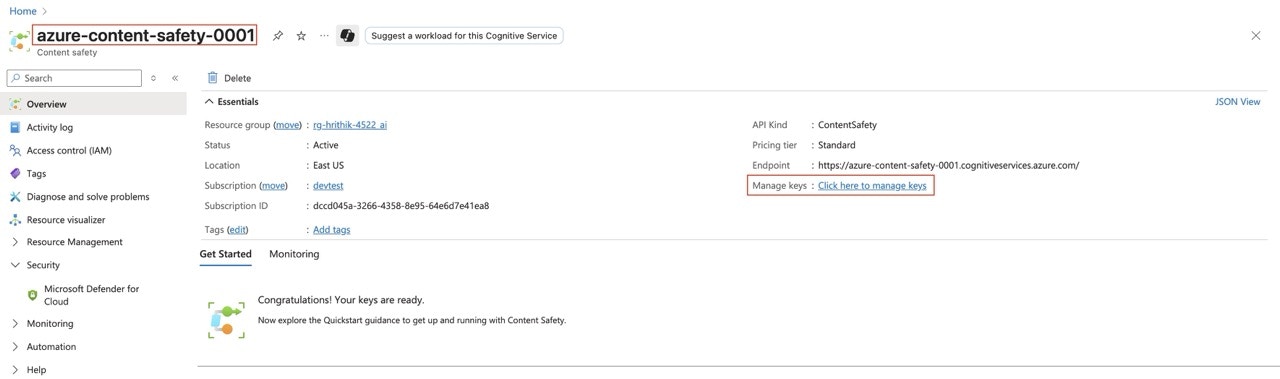
Adding Azure Prompt Shield Guardrail Integration
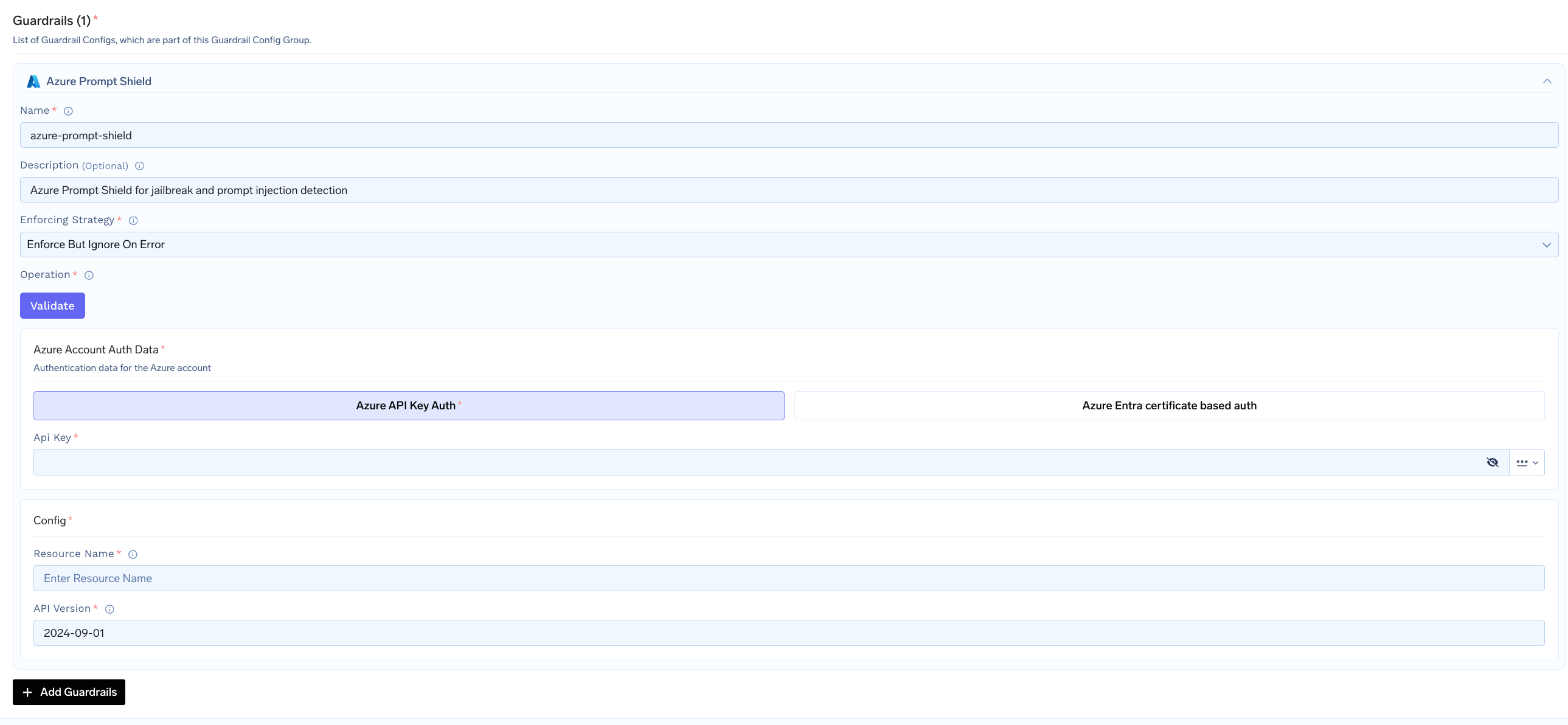
To add Azure Prompt Shield to your TrueFoundry setup, follow these steps: Fill in the Guardrails Group Form- Name: Enter a name for your guardrails group.
- Azure Prompt Shield Config:
- Name: Enter a name for the guardrail configuration
- Resource Name: Your Azure Content Safety resource name
- API Version: The API version to use (Default:
2024-09-01)
- Azure Authentication Data:
- API Key: Your Azure Content Safety API key
As an alternative to API keys, you can authenticate using certificate-based authentication via Microsoft Entra ID. See Azure Entra ID Certificate Authentication for setup instructions.
Configuration Options
| Parameter | Description | Default |
|---|---|---|
| Name | Unique identifier for this guardrail | Required |
| Operation | validate only (detects and blocks, no mutation) | validate |
| Enforcing Strategy | enforce, enforce_but_ignore_on_error, or audit | enforce |
| Resource Name | Azure AI Content Safety resource name | Required |
| API Version | Azure API version | 2024-09-01 |
| Custom Host | Custom endpoint URL (optional, overrides default Azure endpoint) | None |
See Guardrails Overview for details on Operation Modes and Enforcing Strategy.
How Azure Prompt Shield Works
When integrated with TrueFoundry, the system sends the user prompt and any document content to the Azure Prompt Shield API. The response indicates whether attacks were detected in the user prompt or in documents.Response Structure
Example Response: Attack Detected
Example Response: Attack Detected
Example Response: No Attack
Example Response: No Attack
Validation Logic
- If
userPromptAnalysis.attackDetectedistrue, the content is blocked - If any entry in
documentsAnalysishasattackDetected: true, the content is blocked - The violation message indicates where the attack was found:
"Prompt shield violation: user prompt attack"or"Prompt shield violation: document attack"