For new setups, we recommend using Virtual Models to configure routing. Virtual models provide the same routing strategies, retries, and fallbacks, with clearer per-model ownership, access control, and a simpler configuration experience. The global routing configuration described on this page remains functional for existing deployments.
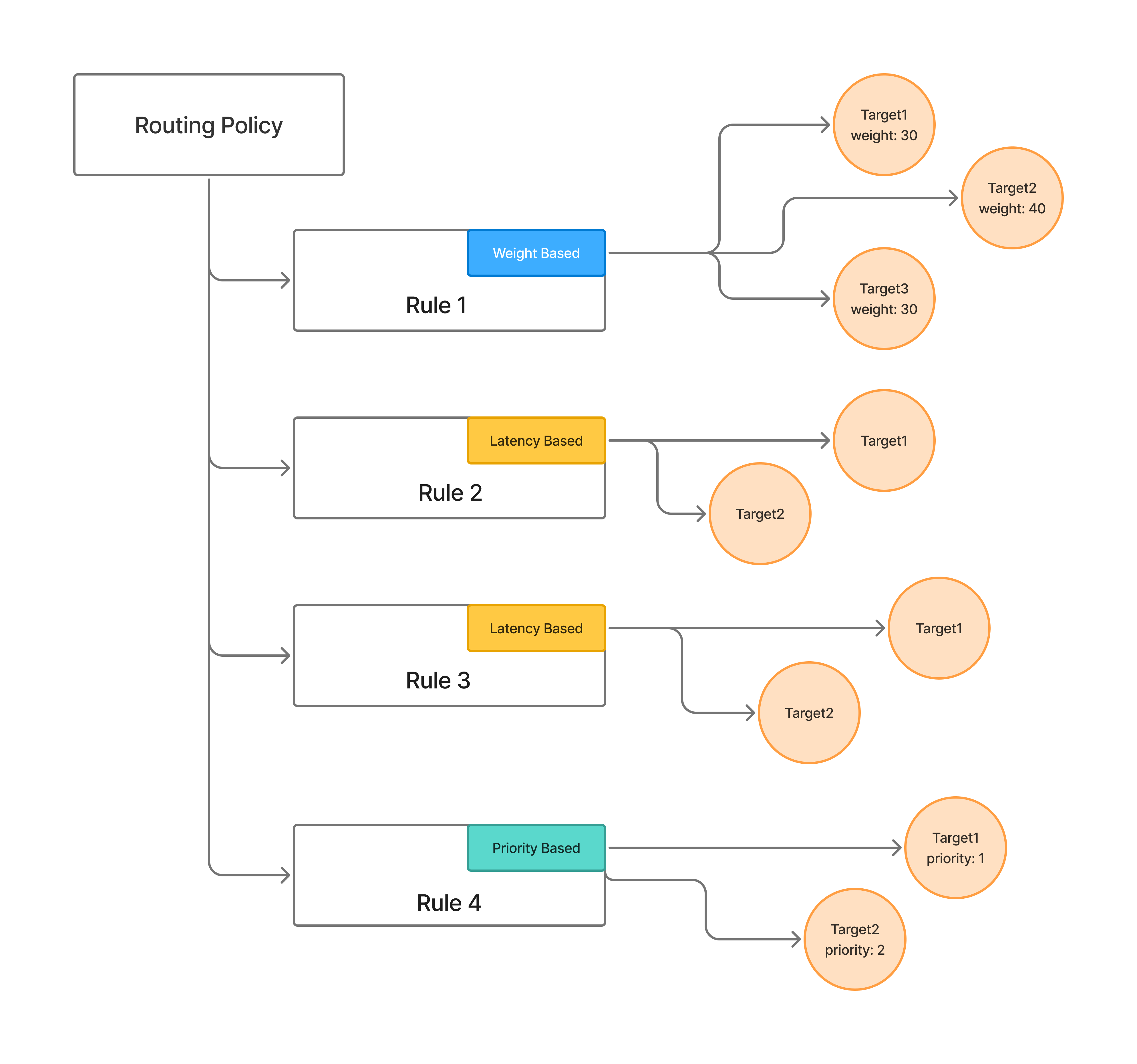
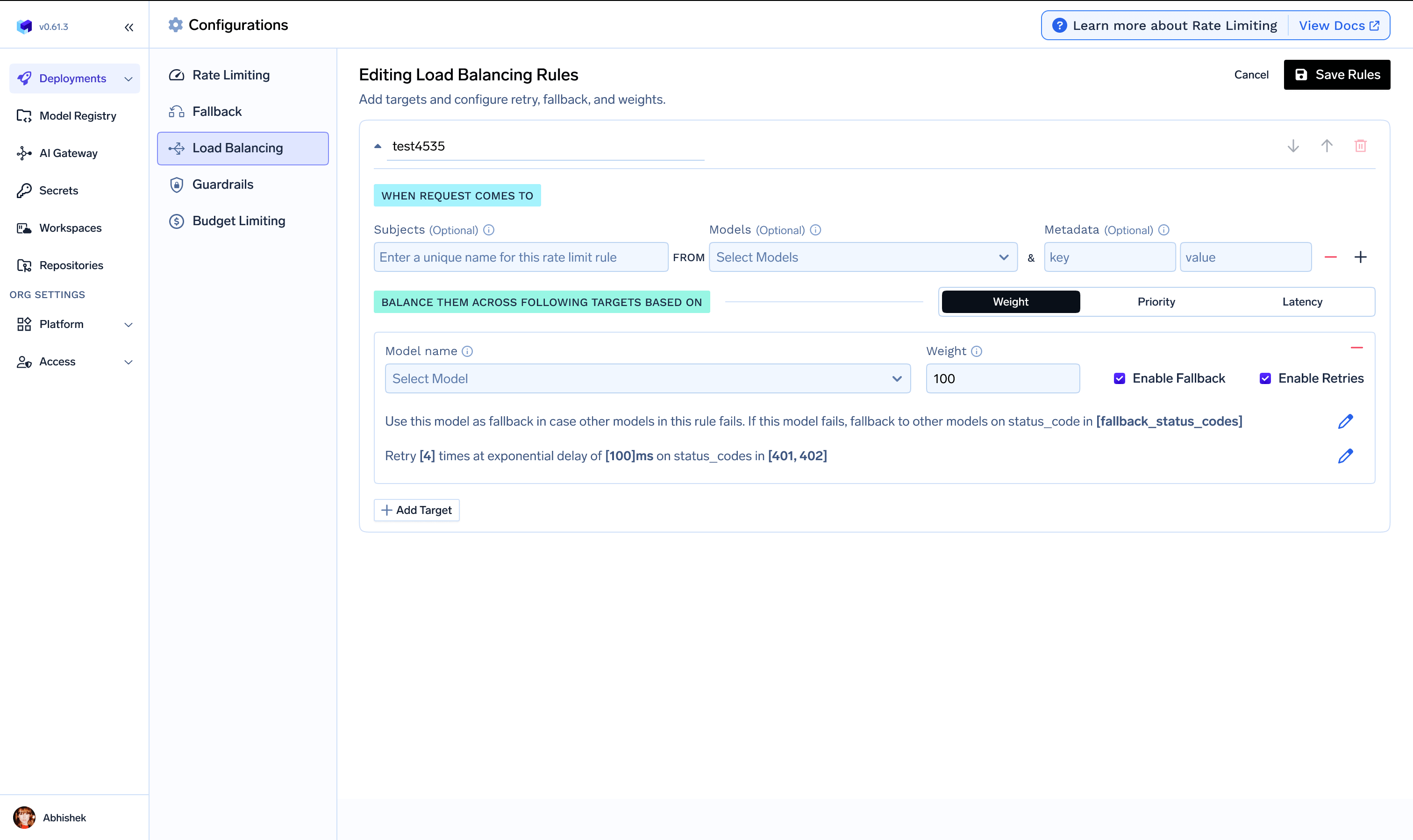
The global routing configuration lets you define load balancing, fallback, and retry rules as a YAML file applied at the tenant level. Rules are evaluated in order for each incoming request — the first matching rule wins and subsequent rules are ignored. Diagram: request flows through routing rules and is assigned to a target model Routing Config UI

Configuration structure

name: string                          # e.g. "loadbalancing-config"
type: gateway-load-balancing-config

rules:
  - id: string                        # unique rule identifier
    type: weight-based-routing | latency-based-routing | priority-based-routing
    when:
      subjects: string[]              # optional: user:..., team:..., virtualaccount:...
      models: string[]                # required: model names to match
      metadata: object                # optional: must match X-TFY-METADATA
    load_balance_targets:
      - target: string                # model identifier in the gateway
        weight: integer               # 0–100, sum 100 (weight-based only)
        priority: integer             # lower = higher priority (priority-based only)
        retry_config:
          attempts: integer           # default: 2
          delay: integer              # ms, default: 100
          on_status_codes: string[]   # default: ["429", "500", "502", "503"]
        fallback_status_codes: string[]  # default: ["401", "403", "404", "429", "500", "502", "503"]
        fallback_candidate: boolean      # default: true
        override_params: object          # e.g. temperature, max_tokens, prompt_version_fqn

Key fields

when — Defines which requests a rule applies to. The subjects, models, and metadata fields are combined with AND logic. If a request doesn’t match one rule’s when block, the next rule is evaluated.
  • subjects — Filter by user, team, or virtual account (for example user:john-doe, team:engineering, virtualaccount:acct_123).
  • models — Rule matches if the request model name is in this list.
  • metadata — Rule matches if the request’s X-TFY-METADATA header contains these key-value pairs.
type — The routing strategy for this rule:
  • weight-based-routing — Distribute traffic by assigned weights that sum to 100.
  • latency-based-routing — Automatically route to the target with the lowest recent latency (time per output token).
  • priority-based-routing — Route to the highest priority (lowest number) healthy target, falling back to the next on failure.
For details on how each strategy behaves (latency algorithm, SLA cutoff, unhealthy detection), see Virtual Models — Routing Strategies. The strategies work identically whether configured here or on a virtual model. load_balance_targets — The list of models eligible for routing in this rule. Per-target options:
  • Retry configurationattempts, delay, and on_status_codes for retries on the same target.
  • Fallback configurationfallback_status_codes to trigger trying another target, and fallback_candidate to control whether a target can receive fallback traffic.
  • Override parameters — Per-target request parameters like temperature, max_tokens, or prompt_version_fqn for model-specific prompts.
prompt_version_fqn override does not work with agents (when using MCP/tools). It is supported for standard chat completion requests.

Common configurations

name: loadbalancing-config
type: gateway-load-balancing-config
rules:
  - id: priority-rate-limit
    type: priority-based-routing
    when:
      models:
        - gpt-4
    load_balance_targets:
      - target: azure/gpt4
        priority: 0
        fallback_status_codes: ["429"]
      - target: openai/gpt4
        priority: 1
        fallback_status_codes: ["429"]
      - target: anthropic/claude-3-opus
        priority: 2
name: loadbalancing-config
type: gateway-load-balancing-config
rules:
  - id: gpt4-canary
    type: weight-based-routing
    when:
      models:
        - gpt-4
    load_balance_targets:
      - target: azure/gpt4-v1
        weight: 90
      - target: azure/gpt4-v2
        weight: 10
name: loadbalancing-config
type: gateway-load-balancing-config
rules:
  - id: priority-failover
    type: priority-based-routing
    when:
      models:
        - gpt-4
    load_balance_targets:
      - target: onprem/llama
        priority: 0
        fallback_status_codes: ["429", "500", "502", "503"]
      - target: bedrock/llama
        priority: 1
        retry_config:
          attempts: 2
          delay: 100
name: loadbalancing-config
type: gateway-load-balancing-config
rules:
  - id: performance-optimized
    type: latency-based-routing
    when:
      models:
        - gpt-4
    load_balance_targets:
      - target: azure/gpt4
        retry_config:
          attempts: 1
      - target: openai/gpt4
        retry_config:
          attempts: 1
name: loadbalancing-config
type: gateway-load-balancing-config
rules:
  - id: dev-environment
    type: weight-based-routing
    when:
      models:
        - gpt-4
      metadata:
        environment: development
    load_balance_targets:
      - target: openai-dev/gpt4
        weight: 100
  - id: prod-environment
    type: latency-based-routing
    when:
      models:
        - gpt-4
      metadata:
        environment: production
    load_balance_targets:
      - target: azure-prod/gpt4
      - target: openai-prod/gpt4
name: loadbalancing-config
type: gateway-load-balancing-config
rules:
  - id: model-specific-prompts
    type: weight-based-routing
    when:
      models:
        - gpt-4
    load_balance_targets:
      - target: openai/gpt4
        weight: 70
        override_params:
          prompt_version_fqn: chat_prompt:internal/my-app/gpt4-optimized-prompt:1
      - target: anthropic/claude-3-opus
        weight: 30
        override_params:
          prompt_version_fqn: chat_prompt:internal/my-app/claude-optimized-prompt:1
name: loadbalancing-config
type: gateway-load-balancing-config
rules:
  - id: apac-user-proximity
    type: priority-based-routing
    when:
      models:
        - gpt-4
      metadata:
        - region: apac
    load_balance_targets:
      - target: azure/gpt4-southeast-asia
        priority: 0
      - target: openai/gpt4
        priority: 1
  - id: booking-app-routing
    type: priority-based-routing
    when:
      subjects:
        - virtualaccount:booking-app
    load_balance_targets:
      - target: openai/gpt4
        priority: 0
        retry_config:
          attempts: 2
          delay: 100
      - target: azure/gpt4
        priority: 0
        retry_config:
          attempts: 1
      - target: bedrock/claude
        priority: 1
        override_params:
          temperature: 0.5

Where to configure

The configuration is managed under AI Gateway → Configs → Routing Config in the UI. You can also store the YAML in your Git repository and apply it with the tfy apply command to enforce a PR review process.
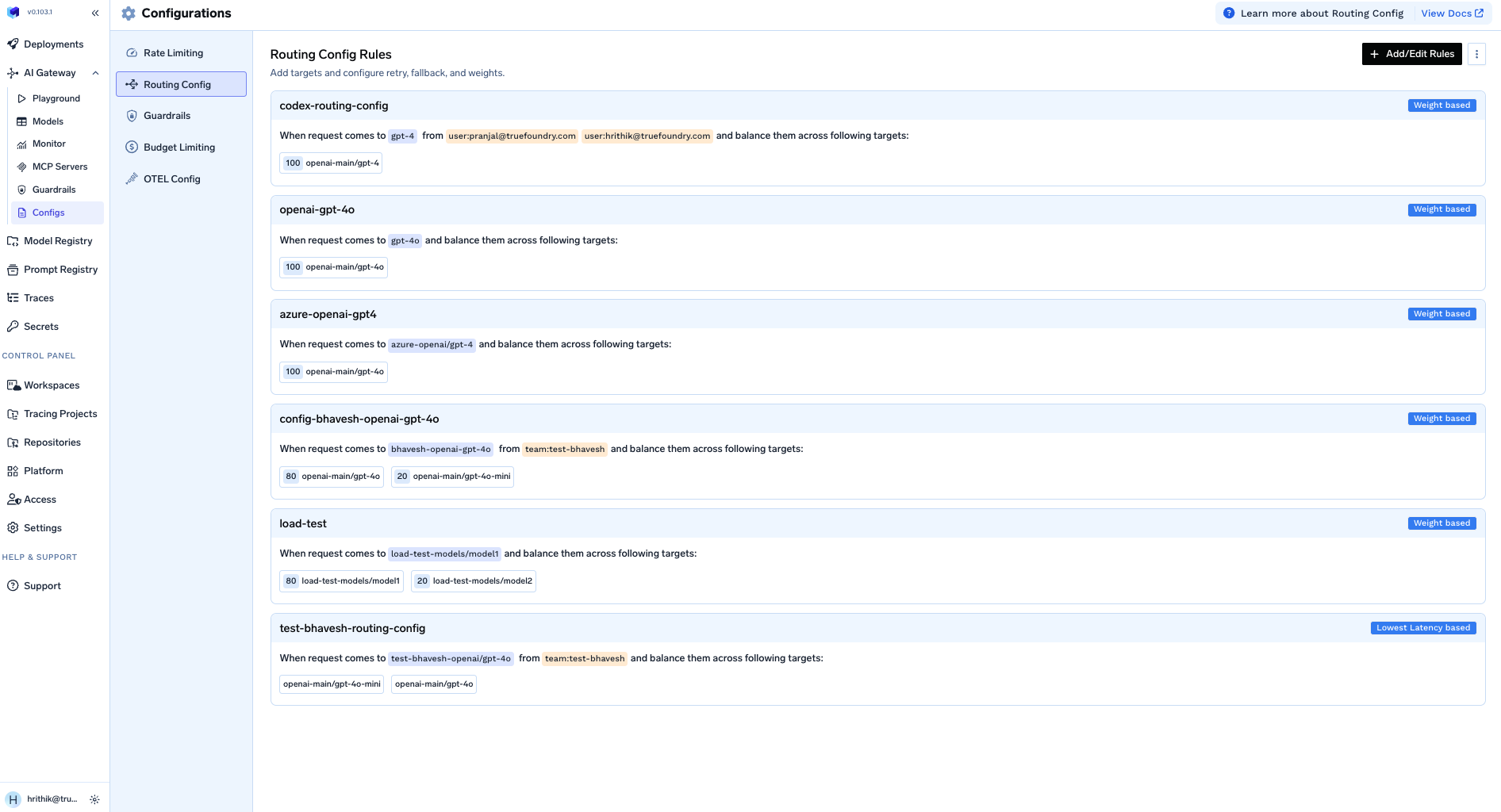
TrueFoundry AI Gateway Configs Tab showing YAML editor for routing configuration

Migrating to virtual models

To move from global routing config to virtual models:
  1. Identify each distinct model your apps send that is backed by rules here.
  2. Create a virtual model with the same targets, strategy, weights/priorities, retries, fallbacks, and override_params.
  3. Point clients at the virtual model using its full path or a slug.
  4. Remove or narrow rules here once traffic uses the virtual model.
For rules that matched metadata or subjects, use different virtual model names per team or environment (for example booking-app/gpt-prod vs booking-app/gpt-dev). See Virtual Models for the full guide.