

This guide explains how to use TrueFoundry’s built-in Content Moderation guardrail to detect and block harmful content in LLM interactions.Documentation Index
Fetch the complete documentation index at: https://www.truefoundry.com/llms.txt
Use this file to discover all available pages before exploring further.
Implementation: This guardrail is powered by Azure Content Safety and runs on TrueFoundry-managed infrastructure — no third-party API keys or setup required. TrueFoundry routes requests across multiple Azure regions to optimize for the lowest possible latency. For vendor-hosted moderation using your own credentials (Azure, OpenAI, AWS Bedrock, Google, and others), see Supported Guardrails and Guardrails Overview.Content Moderation can be applied to all four guardrail hooks: LLM Input, LLM Output, MCP Pre Tool, and MCP Post Tool, providing comprehensive content safety across your entire AI workflow.
What is Content Moderation?
Content Moderation is a built-in TrueFoundry guardrail that analyzes text content for harmful material across four safety categories — hate speech, self-harm, sexual content, and violence. It is powered by Azure Content Safety under the hood and uses a model-based approach with configurable severity thresholds so you can tune sensitivity to match your use case. The guardrail is fully managed by TrueFoundry — no external credentials or setup required — and is optimized for low latency through cross-region availability.Key Features
-
Four Safety Categories: Detects harmful content across:
- Hate — Hate speech, discrimination, and derogatory content
- SelfHarm — Self-injury, suicide-related content
- Sexual — Sexually explicit or suggestive content
- Violence — Violent content, threats, and graphic descriptions
- Configurable Severity Threshold: Set the sensitivity level (0–6) to control what gets flagged — from safe content only to high-risk content, allowing you to balance safety with usability.
- Selective Category Detection: Choose which categories to monitor. Enable all four or only the ones relevant to your application.
Adding Content Moderation Guardrail
Create or Select a Guardrails Group
Create a new guardrails group or select an existing one where you want to add the Content Moderation guardrail.
Add Content Moderation Integration
Click on Add Guardrail and select Content Moderation from the TrueFoundry Guardrails section.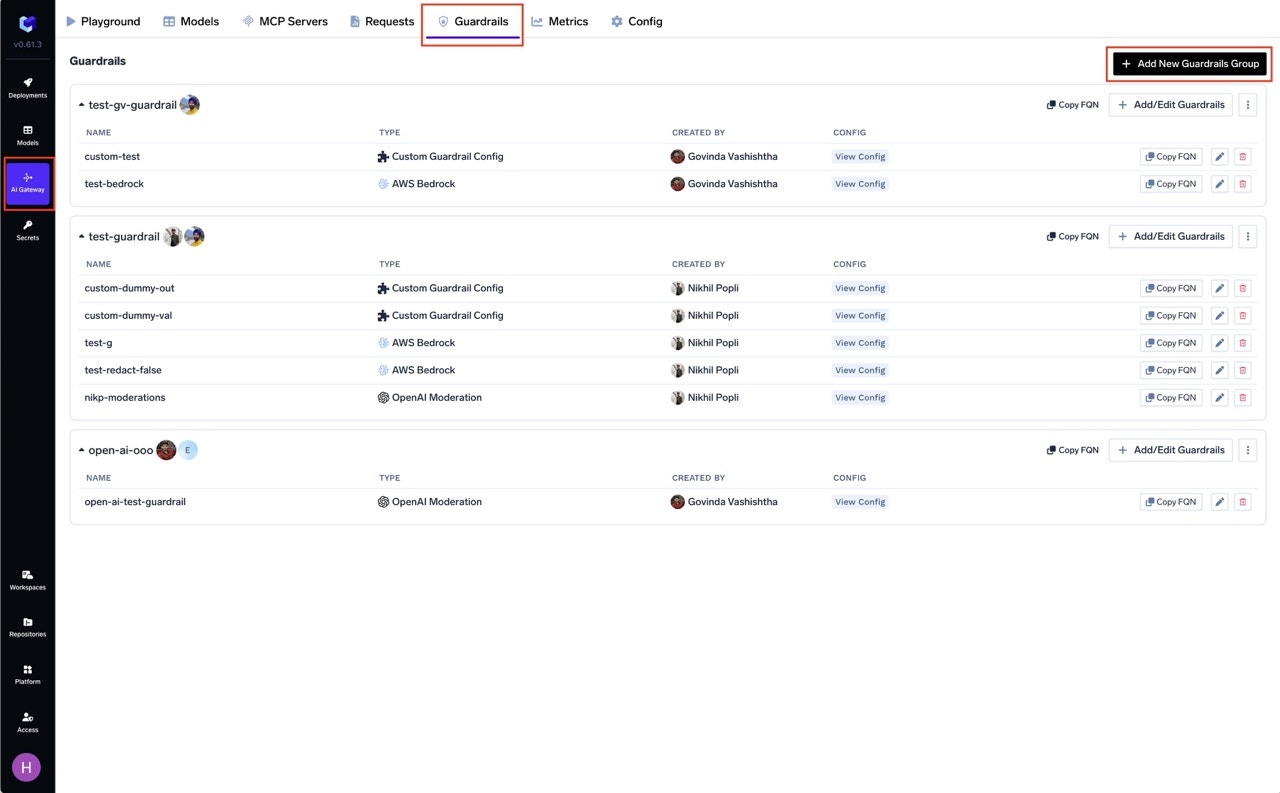
Configure the Guardrail
Fill in the configuration form: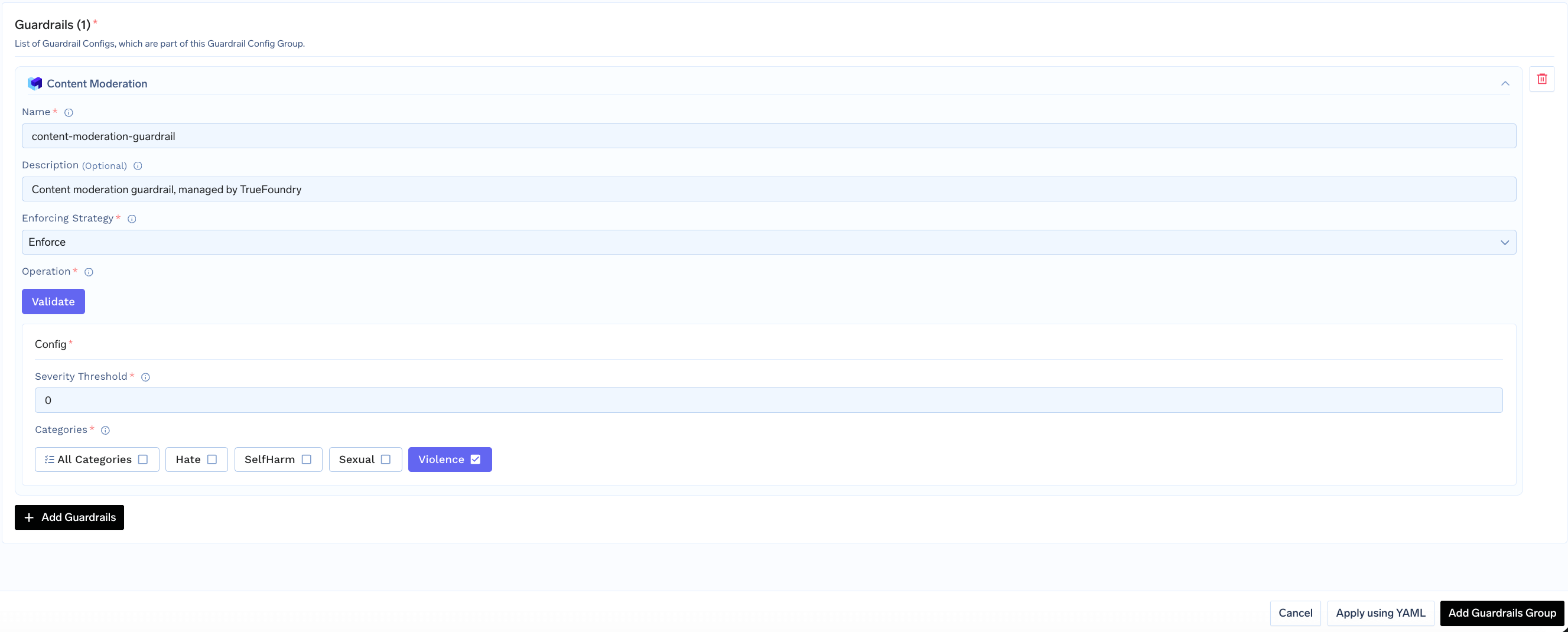
- Name: Enter a unique name for this guardrail configuration (e.g.,
content-moderation) - Severity Threshold: Set the minimum severity level to flag (default:
2) - Categories: Select which content categories to check
- Enforcing Strategy: Choose how violations are handled
Configuration Options
| Parameter | Description | Default |
|---|---|---|
| Name | Unique identifier for this guardrail | Required |
| Operation | validate only (detects and blocks, no mutation) | validate |
| Enforcing Strategy | enforce, enforce_but_ignore_on_error, or audit | enforce |
| Severity Threshold | Minimum severity level (0–6) to flag content | 2 |
| Categories | Array of content categories to check | Required |
Content Moderation only supports validate mode — it detects and blocks harmful content but does not modify it. See Guardrails Overview for details on Enforcing Strategy.
Categories and Severity Levels
Content Categories
| Category | Description |
|---|---|
| Hate | Content expressing hatred, discrimination, or derogation based on identity characteristics |
| SelfHarm | Content related to self-injury, suicide, or self-destructive behavior |
| Sexual | Sexually explicit or suggestive content |
| Violence | Content depicting or promoting physical violence, threats, or graphic injury |
Severity Levels
The severity threshold controls how sensitive the detection is. Content is flagged when any category’s severity meets or exceeds the threshold.| Severity | Level | Description |
|---|---|---|
| 0 | Safe | No harmful content detected |
| 2 | Low | Mildly concerning content (default threshold) |
| 4 | Medium | Moderately harmful content |
| 6 | High | Severely harmful content |
How It Works
The guardrail analyzes content and returns severity scores (0–6) for each enabled category. If any category’s severity meets or exceeds the configured threshold, the content is flagged. Example:Use Cases
Recommended Hook Usage
| Hook | Use Case |
|---|---|
| LLM Input | Block harmful user inputs before they reach the LLM |
| LLM Output | Ensure LLM responses don’t contain harmful content |
| MCP Pre Tool | Validate tool parameters for harmful content |
| MCP Post Tool | Check tool outputs for harmful content |